

StartAllBack
StartAllBack is StartIsBack’s Windows 11 Start / taskbar / Explorer skin (not Microsoft). Official: startallback.com. Current: v3.9.25. Same family as StartIsBack++ on Windows 10. “StartAllBack 3.9 unlocked” is not them. Trial first, then a paid key. This hooks Explorer — after a big Windows update, get the newest StartAllBack before you panic. Hold Esc at logon if a stale build bricks the shell. Not Start11 (Stardock).
Screenshots
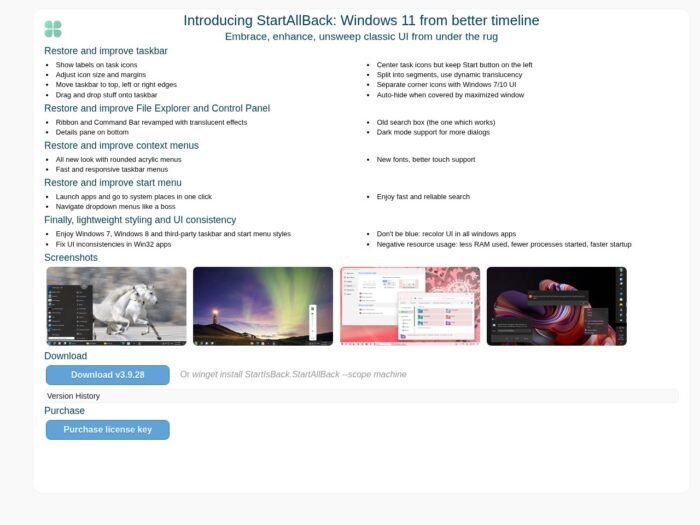
Download StartAllBack for Windows 11
Official download from startallback.com.
Install 3.9.25. Pick a style. Buy a key when the trial ends.
Download StartAllBack 3.9.25
Windows 11 (23H2–25H2 / Insiders) · 3.9.25 · ~2 MB
Home: startallback.com.
winget: winget install StartIsBack.StartAllBack --scope machine
Do not run StartAllBack_3.9_Full.exe. That is not StartAllBack.
Work PCs: volume from the vendor. Don’t deploy a patched StartAllBackX64.dll.
Install 3.9.25 · Need StartIsBack for Win10? · Already licensed?
If you searched for “StartAllBack 3.9 full,” “2026 portable,” or “activated”
There is no extra unlocked setup.
- startallback.com → Download v3.9.25
- Install
- Trial
- Register a real key
A “3.9.25 pre-activated” folder plus a patched licence is stolen licensing. Grey-market keys are often recycled.
Chinese reseller sites are not the developer download.
Your download should start on startallback.com
If the EXE is 40 MB named SAB_Pro_2026, leave. Official setup is about 2 MB.
What to do next
- startallback.com → Download v3.9.25.
- Run
StartAllBack_3.9.25_setup.exe. - Sign out / Explorer restart if asked.
- Right-click Start → StartAllBack properties.
- After Patch Tuesday: check their site again.
Typical install is tiny; it patches the shell, not Office.
Safe disable: hold Escape while signing in to skip StartAllBack if a build mismatches.
Windows may warn you. Check the publisher.
- Publisher should read StartIsBack / StartAllBack.
- SmartScreen is common on a 2 MB UI hook. Use More info only if that name matches.
- Do not turn off Defender to “activate 3.9.”
- Microsoft may warn that third-party shell tools can block upgrades until you update them (24H2-era lesson).
Pick the right Windows file
| Product | What you get | Who it is for |
|---|---|---|
| StartAllBack 3.9.25 | Win11 Start/taskbar | This page |
| StartIsBack++ | Windows 10 | Other product |
| Start11 | Stardock | Other vendor |
| ExplorerPatcher | Other shell tweak | Other project |
Not this download
- “StartAllBack + Windows activator”
- Win10 pack labelled AllBack
- Android APK
Trial and licence
Trial (vendor / mirrors mention on the order of 30–100 days). Then a perpetual key from startallback.com. One PC typical; hardware change may need a re-activate, not a second purchase.
A $3 “lifetime 2026” keygen is not StartAllBack.
Will it run on this PC?
Windows 11 only for this SKU (they call out 23H2 / 24H2 / 25H2 and Insiders). 2 GB RAM class PCs are fine. ~2 MB download. x64. Update StartAllBack before or right after large Windows builds so Explorer doesn’t eat itself. Not a Windows 10 app.
| Official | |
|---|---|
| OS | Windows 11 |
| Size | ~2 MB |
| After updates | Update SAB first |
Already installed? 3.9.25 over it. You do not hunt a second “full.”
Install, first Start menu, and the key
First run
- Open StartAllBack settings.
- Win10 / Win7 / other style.
- Taskbar labels if you want them.
- Register when trial ends.
- Don’t mix two Start-menu tools.
Uninstall: Settings → Apps (shell returns to stock Win11).
If it did not work
- Black taskbar after 25H2 — get 3.9.25, or Esc at login.
- Trial ended — no seat.
- 8 MB
SAB_Unlocked— leave.
Why people still buy official StartAllBack
- Labels, left Start, classic menus
- 3.9.25 still chasing 25H2 / Insiders (Aug 2026)
- Tiny installer
It will not add features Microsoft removed from the OS kernel.
Questions before you trust the installer
Is this the official file?
Yes if it came from startallback.com (~2 MB) and the publisher matches.
Win10?
That’s StartIsBack++, not AllBack.
Safe?
Official StartAllBack installer. Forum “3.9 full” files are the risk. Keep it current after Windows updates.
After you have the file
Install 3.9.25 from startallback.com. Register a real key. Update again after the next Windows drop.
winget: winget install StartIsBack.StartAllBack --scope machine
Publisher: StartIsBack / StartAllBack. Report a page that wrapped this installer in a crack.