

Telegram Desktop
Telegram Desktop is Telegram FZ-LLC’s official Windows client. Current stable: 7.1.5 (2 Sep 2026). Official: desktop.telegram.org and telegram.org/dl/desktop. It is free. “Telegram Gold / Plus / Premium Desktop unlocked” is not Telegram — those EXEs steal sessions. Log in with your phone number. Cloud chats are not the same as phone Secret Chats. Microsoft Store exists; the site + GitHub tdesktop builds are the reference. Do not sideload a “faster Telegram” from a blog.
Screenshots
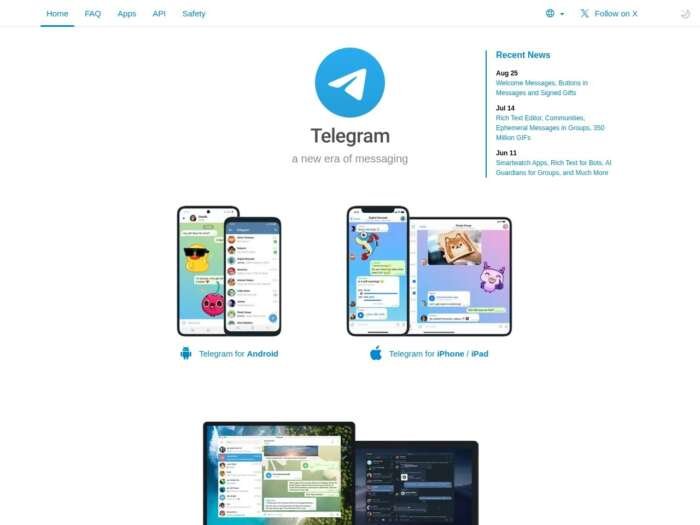
Download Telegram Desktop for Windows
Official download from desktop.telegram.org.
Installer or portable. Sign in. No serial.
Download Telegram Desktop 7.1.5 for Windows
Windows 7+ · x64 / x86 / ARM64 · Free
Site: desktop.telegram.org.
x64 installer: telegram.org/dl/desktop/win64.
Portable x64: telegram.org/dl/desktop/win64_portable.
Source/releases: github.com/telegramdesktop/tdesktop.
Do not run Telegram_Premium_Desktop_Full.exe. That is not Telegram.
Work PCs: Store / Intune / official EXE. Don’t deploy 64Gram unless IT approved an unofficial fork.
Install 7.1.5 · Need portable? · Already signed in?
If you searched for “Telegram Desktop Pro,” “Plus MOD,” or “activated Premium”
There is no extra unlocked Desktop.
- desktop.telegram.org
- Get Telegram for Windows x64 (or ARM / 32-bit)
- Install
- Scan the QR / enter the code from the phone app
A “7.1.5 pre-activated Premium” folder is malware. Telegram Premium is bought in-app / Telegram, not a keygen.
64Gram and other forks are unofficial.
Your download should start on desktop.telegram.org or telegram.org/dl
If the EXE is Telegram_Crack_7.1.exe from a “MOD APK for PC” page, leave. Official Windows installers are about 50–70 MB.
What to do next
- Official button for your CPU (x64 / x86 / ARM).
- Run setup or unzip portable.
- Open Telegram.
- Link the account.
- Turn on 2FA in Settings. Don’t paste “login codes” to strangers.
Typical folder: %AppData%\Telegram Desktop or the portable folder you chose.
Windows may warn you. Check the publisher.
- Publisher should read Telegram FZ-LLC / Telegram Messenger.
- SmartScreen can appear on a new 7.1.5 setup. Use More info only if that name matches.
- Do not turn off Defender to “install Plus.”
- Fake sites clone the bird logo.
Pick the right Windows file
| Product | What you get | Who it is for |
|---|---|---|
| Telegram Desktop 7.1.5 | Official Qt client | This page |
| Portable | No installer | USB / locked PCs |
| Microsoft Store | Store-signed | Optional |
| WhatsApp / Signal | Other messengers | Other vendors |
Not this download
- Telegram Android APK on Windows
- “Telegram++ Desktop”
- XP build (last official XP was 1.8.15)
Trial and licence
Free (GPLv3 client + Telegram ToS). Premium is optional (larger uploads, extras) via Telegram payment — cancel in the account / app stores. No Windows serial.
Will it run on this PC?
GitHub: Windows 7 and above, 64-bit and 32-bit + Windows 10/11 ARM builds. Light RAM/disk (~50–100 MB app). Internet required. Phone number for first login. Not XP/Vista on current 7.1.x.
| Official current | |
|---|---|
| OS | Win7+ (x86/x64/ARM) |
| Size | ~50–70 MB |
| Login | Phone / QR |
Already installed? In-app update or the same official EXE. You do not hunt a second “full.”
Install, first chat, and the account
First run
- Open Telegram.
- QR or code from the phone.
- Settings → Privacy / 2FA / passcode.
- Don’t join “Free Premium” bots.
- Desktop cloud chats ≠ Secret Chat on the phone.
Uninstall: Settings → Apps (portable: delete the folder).
If it did not work
- Session stolen — revoke in Active sessions on the phone.
- “Plus” features missing — those were a MOD.
- 8 MB
TG_Unlocked— leave.
Why people still install official Desktop
- Real client, frequent 7.1.x updates
- Portable option
- No licence key
It will not make cloud chats into Signal-style E2EE by default.
Questions before you trust the installer
Is this the official file?
Yes if it came from desktop.telegram.org / telegram.org/dl / GitHub tdesktop releases.
Is it free?
Yes.
Safe?
Official Telegram installer. Forum “Telegram Premium Desktop” files are the risk.
After you have the file
Install 7.1.5 from desktop.telegram.org. Sign in with your number. Buy Premium only inside Telegram if you want it.
Publisher: Telegram FZ-LLC. Report a page that wrapped this installer in a crack or session stealer.