

LDPlayer 14.0.32.0
LDPlayer Download for PC: Features, Installation, and Complete Guide
LDPlayer is a free Android emulator for Windows that allows you to run compatible Android games and applications on your computer. Designed primarily for mobile gaming, it brings touchscreen-based games to a larger display and lets you use a keyboard, mouse, or compatible game controller.
With features such as customizable key mapping, multi-instance management, macro recording, and graphics settings, LDPlayer offers more flexibility than playing Android games directly on a phone. It can also install compatible apps through Google Play or APK files.
If you are looking for an LDPlayer download for PC, this guide explains how the emulator works, how to install it, which features matter most, and what to consider before using it.
Screenshots
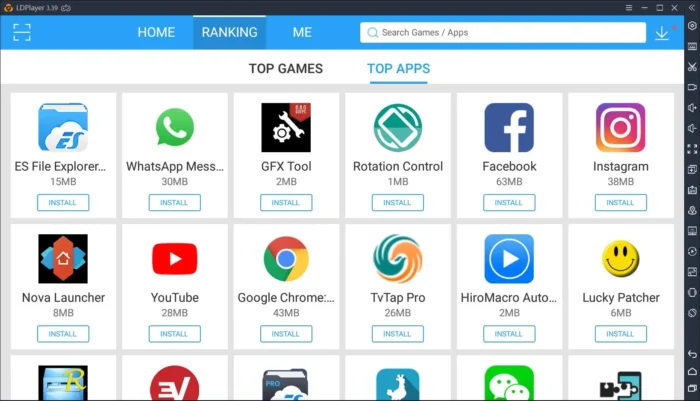
LDPlayer Download for Windows
You can get LDPlayer from its official website:
Official download page: https://www.ldplayer.net/
LDPlayer offers different Android emulator versions, including LDPlayer 9 and LDPlayer 14. Their Android foundations and compatibility characteristics differ, so the best version depends on the games you want to play and the stability or newer Android support you need.
Before downloading, check the current release information, supported Windows versions, and system requirements. The developer may update installation packages and version availability over time.
How to Download and Install LDPlayer
Follow these steps to install LDPlayer on your computer:
- Visit the official LDPlayer website.
- Choose the available version that suits your needs.
- Download the Windows installer.
- Open the downloaded setup file and follow the installation instructions.
- Review the installation options carefully before accepting them.
- Launch LDPlayer after installation.
- Open Google Play, if available, and sign in to install your preferred games.
- Adjust the emulator settings and control layout before playing.
For security, download the installer from the official website rather than an unknown third-party source. Read each installation screen carefully and decline any optional software you do not want.
What Is LDPlayer?
LDPlayer is an Android emulator that creates a virtual Android environment on a Windows PC. Instead of running an Android game directly on a smartphone, the emulator runs it within a software environment on your computer.
This setup can be useful for players who prefer a larger screen, physical keyboard controls, mouse aiming, or multiple game sessions. It can also help users test certain Android applications without constantly switching between physical devices.
However, an emulator is not identical to a real Android phone. App compatibility, performance, hardware features, and security checks can differ between a virtual device and a physical device.
Key Features of LDPlayer
1. Keyboard and Mouse Mapping
One of LDPlayer’s main features is its customizable control-mapping system. It lets you assign keyboard keys and mouse actions to touchscreen controls within supported games.
For example, you can configure movement keys, assign buttons to abilities, or set up mouse-based aiming where the game and control profile support it.
LDPlayer also provides control profiles for selected games, which can reduce the amount of manual setup required. The available layouts vary by game and software version, and you may need to adjust sensitivity or bindings to suit your preferences.
2. Multi-Instance Manager
LDPlayer’s multi-instance tools let you create and operate separate Android environments on the same computer.
This can be useful if you want to use different accounts, test apps in separate environments, or run compatible games side by side. Each instance can have its own applications and settings.
The main limitation is resource usage. Every active instance consumes CPU time, memory, and potentially graphics resources. Running several instances simultaneously may require significantly more powerful hardware than running a single game.
3. Synchronizer for Multiple Instances
The Synchronizer can mirror supported inputs across multiple emulator instances. For example, an action performed in one instance can be replicated in other synchronized instances.
This feature may help users manage repetitive tasks across accounts, but its usefulness depends on the game and the actions being performed. Some games restrict automation or multi-account activity, so check the applicable rules before using these tools.
4. Macro Recording
LDPlayer includes macro functionality for recording and replaying sequences of inputs in supported configurations.
A macro might repeat a series of clicks or key presses that would otherwise require manual input. This can be convenient for repetitive workflows, but it does not guarantee that every sequence will work reliably across game updates or different screen layouts.
Be mindful of game policies. Automated gameplay, unattended farming, or other forms of automation may violate a game’s terms of service and could lead to restrictions or account penalties.
5. Graphics and Frame-Rate Settings
LDPlayer provides settings that help users balance image quality and performance. Depending on the version, these may include resolution, CPU and memory allocation, frame-rate options, and graphics rendering settings.
Higher frame rates can make supported games appear smoother, particularly when the computer and game can maintain the selected rate. However, choosing a higher setting does not guarantee higher actual FPS.
Performance depends on the computer’s processor, graphics hardware, drivers, emulator version, and the game itself. A demanding mobile game may still experience lag on a system with limited resources.
6. Gamepad Support
Compatible controllers provide another way to interact with games in LDPlayer. This can be useful for racing games, action titles, and other games that feel more natural with a physical controller.
Controller support and the required setup vary by device and game. Some games may need manual mapping, and not every controller will work identically.
7. APK Installation
LDPlayer supports installing compatible Android applications through APK files, in addition to using an available app store.
To install an APK:
- Download the APK from a reputable source.
- Start LDPlayer.
- Open the APK installation option or use a supported drag-and-drop method.
- Select the downloaded file.
- Wait for the installation to finish.
- Launch the application from the emulator.
Some applications require additional data files, Google services, or a particular Android version. Installing an APK also does not guarantee that an app will run correctly.
Only use APK files from sources you trust, because modified or malicious packages can compromise your accounts and data.
8. Virtual Location and Display Customization
Some LDPlayer versions and configurations offer additional utilities, including virtual-location features and controls for screen resolution and display scaling.
Virtual-location tools may be relevant to certain location-based applications, but availability and compatibility can vary. Location simulation may also violate individual apps’ rules, so review those policies before using it.
Resolution and display settings let you tailor the virtual screen to your monitor and preferences. Higher resolutions may improve clarity but can also increase graphics workload.
LDPlayer 9 vs. LDPlayer 14
Choosing the right Android environment is important because games can behave differently across Android versions.
| Feature | LDPlayer 9 | LDPlayer 14 |
|---|---|---|
| Android foundation | Android 9 | Android 14 |
| Main consideration | Compatibility with games tested on the older environment | Compatibility with applications that benefit from a newer Android environment |
| Game support | Depends on the title and current build | Depends on the title and current build |
| Performance | Varies by PC and game | Varies by PC and game |
| Best approach | Check compatibility with your preferred games | Check compatibility and release stability before switching |
LDPlayer 14 has been introduced as an Android 14-based version, while LDPlayer 9 remains a separate option. Newer Android support can help with some applications, but it does not automatically make every game faster or more compatible.
If a game works better in one version, there may be no reason to switch. Review the developer’s release notes and test your specific games before choosing an environment.
LDPlayer System Requirements
The hardware needed for LDPlayer depends on the emulator version, Android environment, game, graphics settings, and number of active instances.
Before installing, check the current requirements on the official website. As a general guide, consider the following components:
- Operating system: Use a Windows version supported by the particular LDPlayer release.
- Processor: A compatible Intel or AMD processor is essential. Modern multi-core processors are useful for demanding games and multi-instance setups.
- RAM: More memory helps when running graphically demanding games or several emulator instances at once.
- Graphics hardware: A compatible graphics adapter and updated drivers can improve rendering and stability. A dedicated GPU may help with demanding titles, although it is not universally required.
- Storage: Keep sufficient free space for the emulator, Android environments, game installations, updates, and additional data.
- Virtualization: Hardware virtualization can affect emulator performance. Check the setup guidance for your version and Windows configuration.
A computer that meets minimum requirements may still struggle with demanding games or multiple instances. For smoother results, avoid allocating more resources to the emulator than your PC can comfortably provide.
Is LDPlayer Safe to Download?
The safest starting point is the official LDPlayer website. This reduces the risk of downloading a modified installer from an unknown third party, although downloading from an official source alone cannot guarantee that all software behavior is risk-free.
Online discussions have raised concerns about installer behavior, optional software, background processes, and security detections associated with emulators. Such reports should be evaluated individually rather than treated as proof that every installation is malicious—or as proof that every version is completely risk-free.
To reduce risk:
- Download LDPlayer from its official website.
- Review installation prompts and decline unwanted optional offers.
- Keep Windows and your security software updated.
- Check unexpected antivirus detections before deciding whether to run a file.
- Avoid installing unknown APKs or entering sensitive account details into untrusted applications.
- Uninstall software you no longer use.
If you use your computer for sensitive work, consider whether installing additional virtualization software fits your security requirements. Do not disable security protections simply to make an emulator run unless you understand the implications and have confirmed that the change is necessary.
Advantages and Disadvantages of LDPlayer
Advantages
- Runs compatible Android games and applications on Windows.
- Provides customizable keyboard and mouse controls.
- Supports multi-instance management.
- Includes synchronization and macro features in supported versions.
- Offers gamepad support.
- Allows installation of compatible APK files.
- Provides graphics and performance settings.
- Offers Android environments with different version foundations.
Disadvantages
- Compatibility varies between games and Android environments.
- Demanding games may require capable CPU and graphics hardware.
- Multiple instances can consume substantial memory and processing power.
- Some games restrict or block emulator use.
- Advanced controls and performance settings may require manual configuration.
- Installation options and security detections should be reviewed carefully.
- A newer Android version does not guarantee better performance in every game.
LDPlayer vs. BlueStacks
LDPlayer and BlueStacks are both Android emulators designed to run mobile games and apps on Windows PCs.
LDPlayer emphasizes gaming controls, multi-instance management, and customization. BlueStacks is another established option with its own game compatibility, interface, and resource-management features.
Neither emulator is automatically the best choice for every user. Performance can vary substantially depending on the game, hardware, settings, and installed versions.
If you mainly play one or two specific games, check their current emulator compatibility and compare both options on your computer before deciding.
Frequently Asked Questions
1. Is LDPlayer free to download?
LDPlayer is distributed as a free Android emulator. Check its official website for the current licensing terms and any optional services or offers.
2. Can I use LDPlayer on Windows 10 and Windows 11?
LDPlayer has Windows versions intended for PC use, but supported operating systems can vary by release. Check the current requirements for your chosen version before installing.
3. Does LDPlayer support Android 14?
Yes. LDPlayer 14 is based on Android 14. LDPlayer 9 is a separate Android 9-based environment. Availability and release status can change, so consult the official download page for the latest information.
4. Can I install games without Google Play?
Yes, you can install compatible applications using APK files where supported. Download APKs only from trusted sources, and remember that some apps require additional services or may block emulator use.
5. Can LDPlayer run multiple accounts simultaneously?
Its multi-instance manager can run separate Android environments, allowing multiple sessions in supported configurations. Actual performance depends on your hardware and the games involved.
6. Does LDPlayer support high FPS?
LDPlayer offers frame-rate settings for supported configurations, but the actual FPS depends on the game, hardware, drivers, and emulator settings. Higher frame rates are not guaranteed for every title.
7. Why does LDPlayer lag or crash?
Possible causes include limited RAM, high CPU or GPU usage, outdated graphics drivers, incompatible game versions, or incorrect emulator settings. Updating the emulator, reviewing resource allocation, and checking the game’s compatibility may help.
8. Can I use a controller with LDPlayer?
LDPlayer supports compatible gamepads in supported configurations. Depending on the game and controller, you may need to adjust the control mapping.
Final Verdict
LDPlayer is worth considering if you want to play Android games on a Windows PC using keyboard and mouse controls, a compatible gamepad, or multiple Android instances. Its control mapping, synchronization, macros, and graphics settings provide useful flexibility for mobile gamers.
However, it is not a universal solution for every game or computer. Performance depends on hardware, compatibility can vary between Android environments, and some games restrict emulator use.
For the best results, download LDPlayer from the official website, select the Android version that suits your preferred games, and check the current system requirements before installing.
Download LDPlayer: https://www.ldplayer.net/