

Adobe Express
Adobe Express is a web app. Adobe’s own Windows page (March 2026): it does not have a companion desktop version. You open express.adobe.com and optionally install it as a PWA in Chrome or Edge. “Express 2026 full” is not a cracked Photoshop. Adobe Express Photos (old Photoshop Express) is a different Microsoft Store photo app.
Screenshots
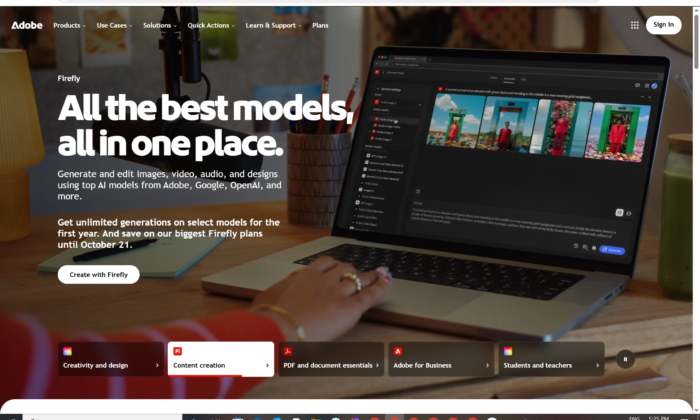
Adobe Express for Windows
Official path: browser first — then Install as an app.
Express is social graphics, short video, brand kits and Firefly-style tools in the browser. There is no AdobeExpress_Setup.exe from Adobe. Safari and Firefox cannot install the PWA.
Use Adobe Express on Windows (web + PWA)
Windows 11 · Chrome 100+ or Edge 107+ · express.adobe.com · Optional PWA · Free tier + paid Express / CC plans
Official start: express.adobe.com or open Express from Creative Cloud.
Install as PWA: Download the Adobe Express app.
Web requirements: Desktop web technical requirements.
Do not run Adobe_Express_2026_Unlocked.exe. That is not Adobe.
Work PCs: allow express.adobe.com and the Adobe identity hosts. Do not sideload an MSIX named Express.
Open in browser · Install PWA · Express Photos instead?
If you searched for “Express 2026 full,” “portable Photoshop Express,” or “activated”
There is no extra unlocked setup.
- Go to Adobe Express
- Sign in with an Adobe ID
- In Chrome or Edge: Install Adobe Express (account menu or address-bar install)
- Pin to the taskbar
A 400 MB “Express Pro 2026” folder is stolen branding. Grey-market keys are recycled Adobe IDs.
Adobe Express download is the website — or a PWA
If an EXE starts downloading from a blog, leave.
What to do next
- Open Chrome or Edge on Windows 11.
- Go to Express and sign in.
- Account menu → Install Adobe Express, or use the install icon in the address bar.
- Confirm Install.
- Pin to taskbar. Work online.
Typical result: a shortcut that still talks to Adobe’s servers. Offline “full” packs cannot replace that.
Need a photo-only Store app? That is Adobe Express Photos from adobe.com/express/photos / Microsoft Store — not the Express editor.
Windows may warn you. Check the publisher.
- Browser / PWA publisher should read Adobe.
- Store listing for Express Photos should read Adobe.
- SmartScreen on a random
Express_Setup.exe— cancel. - Do not turn off Defender to “unlock Premium templates.”
Pick the right thing
| Product | What you get | Who it is for |
|---|---|---|
| Adobe Express (web / PWA) | Templates, video, brand kit, gen AI | This page |
| Adobe Express Photos | Simple photo editor (Store) | Quick snaps |
| Photoshop | Pro pixels | Different product |
| Premiere Express / Rush | Rush is dead; Express video is in the web app | Do not hunt Rush |
Not this download
- Canva “Express pack”
- Photoshop Express 2018 APK on Windows
- Spark Post leftover brands sold as 2026
Trial and account
Express has a free Adobe ID tier and paid Express / Creative Cloud plans for extra templates, brand and generative features. Cancel in account.adobe.com if a trial flips to paid.
A $8 “Express lifetime” key is not Adobe.
Will Adobe Express run on this PC?
Express web official floor: Windows 11, Chrome 100+ or Edge 107+ (Firefox 117+ works in the browser but cannot install the PWA), 4 GB RAM, JavaScript on, hardware acceleration on, WebGL2 + WebAssembly. Safari/Firefox = no PWA install.
| Official (web) | |
|---|---|
| OS | Windows 11 |
| Browser | Chrome 100+ / Edge 107+ (PWA) |
| RAM | 4 GB |
| GPU path | Hardware acceleration + WebGL2 |
Express Photos (Store) is a separate floor: Win10 20H2+ 64-bit, SSE 4.2, 8 GB RAM.
Already using Express in the browser? You do not need an EXE.
First file
- Open Express.
- Sign in.
- New Instagram post or a short video — not a print magazine.
- Export PNG / MP4, or PSD if you need Photoshop (Adobe added PSD export in 2026 notes).
- Install the PWA only if you want a taskbar icon.
If it did not work
- No Install button — Firefox/Safari, or not signed in.
- Black canvas — hardware acceleration off.
- 40 MB
Express_Unlocked— leave. - Want layers — that is Photoshop, or export PSD from Express.
Why this is not a Setup.exe page
- Adobe documents no companion desktop version
- Features ship in the August 2026 web release (sound effects, PSD export, etc.)
- The PWA is still the website
Keep the browser current. That is how Express updates.
Questions before you trust a “download”
Is there an official Express EXE?
No. Web + PWA. Express Photos is the Store photo app.
Is Express free?
A free tier exists. Premium features are paid.
Express vs Photoshop?
Express is quick design. Photoshop is the pixel editor.
Safe?
Official Adobe site + Store Photos app. Forum “Express 2026 full” files are the risk.
After you open the site
Sign in at Express. Install the PWA in Chrome or Edge if you want. Skip every third-party EXE.
PWA steps: Download the Adobe Express app
Web requirements: technical requirements
Photos app: Install Express Photos
Publisher: Adobe. Express is their mark. Report a page that wrapped this product in a crack.