

Free Download Manager (FDM) 6.35.2.7075
Free Download Manager (FDM) is a free download manager and accelerator from FreeDownloadManager.ORG. It helps you organize downloads, resume interrupted transfers, manage download speeds, and download files using supported protocols, including BitTorrent. Get the appropriate installer from the official Free Download Manager download page. FDM is available for multiple platforms, but operating system requirements and available features depend on the release. Avoid unofficial “Pro,” “premium unlocked,” cracked, or pre-activated downloads. Free Download Manager is a separate product from Internet Download Manager (IDM). Always respect copyright, website terms, and any restrictions that apply to the files you download.
Screenshots
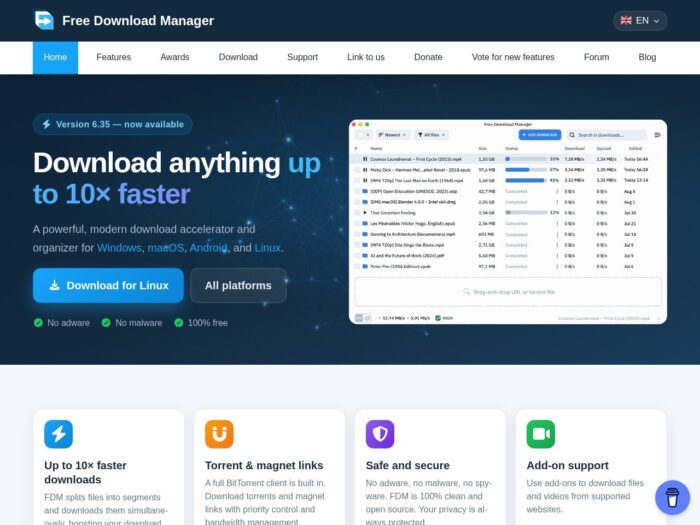
Download Free Download Manager for Windows
Download FDM from the official website.
Free to download and use. No purchase or serial key is required for the free application.
Choose the appropriate Windows installer
Check the official download page for the latest available release, supported Windows versions, system architecture, and installer details before downloading.
Download: Official FDM downloads.
Release notes: Free Download Manager changelog.
Avoid installers advertised as cracked, pre-activated, or unlocked editions. If you manage work computers, obtain installation files from the official source and follow your organization’s software deployment and security policies.
Installing FDM for the first time? Follow the instructions for your operating system. Already installed? Check the official release information for available updates and compatibility.
Looking for Free Download Manager Pro or a full version?
Start with the official download page rather than searching for modified installers or licence keys. Free Download Manager is offered as a free application through its official website. Verify any claims about paid editions or additional features directly with the developer before purchasing anything.
- Official Free Download Manager downloads
- Windows installers and other platform-specific downloads
- Official browser extensions, where available
- Optional add-ons listed on the official website
Be cautious of third-party pages offering cracked, pre-activated, or supposedly premium editions. Modified installers can introduce unwanted software, compromise security, or expose personal information. A download described as portable or unlocked is not necessarily authentic or safe.
For the safest starting point, use the developer’s official website and verify the source of any additional files before installing them.
Make sure your download comes from the official website
Use freedownloadmanager.org/download.htm to obtain the installer. File size and filenames can change between releases, so do not rely on a particular number of megabytes or filename to determine whether a download is genuine.
What to do next
- Open the official download page and select the appropriate installer.
- Check system compatibility and any available publisher or digital signature information.
- Install the application and review its settings.
- Add the official browser extension if you want browser integration and your browser is supported.
- Test FDM with a file you are authorized to download.
The default installation location depends on your operating system, installer, and installation choices. On Windows, check the installation settings or application shortcut if you need to locate the program files.
Windows may display a security warning
- Check the download source and available publisher or digital signature information before running the installer.
- If Windows SmartScreen displays a warning, investigate the warning and verify the file before deciding whether to proceed.
- Do not disable Microsoft Defender or other security protections just to install a download manager or an unofficial add-on.
- Review browser-extension permissions carefully. Extensions that can read or change website data may have access to sensitive browsing information.
- If the file’s origin or authenticity is uncertain, do not run it. Return to the official download page and obtain a fresh copy.
Choose the right Free Download Manager version
| Download option | What it provides | Who should choose it |
|---|---|---|
| Current Windows release | The latest Windows version offered by the developer | Users with a supported Windows installation |
| Older Windows release | A legacy version listed by the developer | Users who need compatibility with an older operating system |
| Other platform releases | Downloads for supported platforms such as macOS, Linux, and Android | Users installing FDM on a different device or operating system |
| Browser extensions and add-ons | Optional integration or additional functionality | Users who need a supported extension or add-on |
Downloads to avoid
- Unofficial pages advertising cracked or unlocked editions
- Installers bundled with unknown applications or unwanted software
- Browser extensions from unverified publishers claiming to be official
- Files for a different operating system or processor architecture
For older computers, consult the official archive and check the requirements of each available release. An older version may have compatibility limitations or lack security fixes, so use it only when necessary.
Free Download Manager pricing and licence
Free Download Manager is offered as a free application through its official website. You can check the developer’s website for current licensing information, available features, and any optional services or add-ons.
Be wary of unofficial sellers offering activation keys or lifetime licences for products or editions that the developer does not confirm. Verify any payment request directly with the official source before spending money.
Will Free Download Manager run on your PC?
Compatibility depends on the FDM release, your operating system, processor architecture, and browser. Before installing, check the official download page for supported Windows versions, system requirements, and available installer options.
Browser integration may require a compatible extension. Extension availability and installation instructions can vary by browser and release. An internet connection is required to download the installer and retrieve online files.
| Item | What to check |
|---|---|
| Windows compatibility | Supported operating system and processor architecture |
| Installer size | Current file details on the official download page |
| Browser integration | Availability of a compatible official extension |
| Cost | Current licensing information from the developer |
| Older computers | Officially listed legacy releases and their limitations |
Already installed? Check the official changelog and update instructions to determine whether a newer release is available and supported on your system.
Install Free Download Manager and set up browser integration
First run
- Install FDM using the official installer for your platform.
- Open the application and review the available settings.
- If needed, install the official browser extension for a supported browser.
- Test a direct download link for a file you are authorized to save.
- Install optional add-ons only when they are listed or linked by a source you trust.
Uninstall: Use your operating system’s application removal settings to uninstall FDM. Remove its browser extension separately if it is not removed automatically.
If it does not work
- Downloads are not detected in the browser: Check whether the extension is installed, enabled, and compatible with your browser.
- The installer will not run: Verify operating system compatibility, processor architecture, and the integrity of the downloaded file.
- A download fails or cannot resume: Check your connection, available storage, download URL, and whether the source server permits the requested transfer.
- An add-on is unavailable: Consult the official website for current availability and installation instructions.
- The installer looks suspicious: Do not run it. Download a fresh copy from the official source.
Why use Free Download Manager?
- Download acceleration: FDM can split supported downloads into sections to improve transfer performance when the server and connection allow it.
- Resume support: Continue certain interrupted downloads without restarting from the beginning.
- Download organization: Manage files, categories, and download tasks in one application.
- Bandwidth controls: Adjust download activity to suit your connection and other online tasks.
- BitTorrent support: Handle supported torrent and magnet-link downloads.
- Browser integration: Use compatible official extensions where available.
Actual speed and functionality depend on your internet connection, the source server, the file, and the installed release. Using a download manager does not grant permission to bypass access restrictions, violate website terms, or download copyrighted material without authorization.
Frequently asked questions about Free Download Manager
Where can I download the official Free Download Manager installer?
Use the official download page to choose the appropriate installer for your platform.
Is Free Download Manager free?
Yes. The developer offers FDM as a free application. Check the official website for current licensing details and information about any optional services.
Is Free Download Manager the same as Internet Download Manager?
No. They are separate download-management products from different providers.
Is Free Download Manager safe to install?
Obtain the installer from the official website and verify its source and publisher information. No software download should be considered risk-free solely because of its name or filename.
Does FDM support older versions of Windows?
Support varies by release. Check the official download page for available legacy releases and their system requirements.
Does FDM work with browser extensions?
FDM offers browser integration through supported extensions. Check the official website and your browser’s extension store for current availability and instructions.
Can I use FDM to download videos or torrents?
FDM supports BitTorrent downloads, and optional add-ons may provide additional downloading capabilities. Availability depends on the release and supported source websites. Always respect copyright, permissions, and applicable terms.
After downloading Free Download Manager
Get the appropriate release from freedownloadmanager.org/download.htm, review the installation requirements, and follow the official setup instructions. Use the official changelog to check release information and updates.
Verify the download source before running the installer, keep your software updated when supported, and download only files you have permission to access and retain.