

Internet Download Manager (IDM) 6.43 Build 16
Internet Download Manager (IDM) Free Download for Windows
What’s New in Version 6.43 Build 16
Released: October 23, 2026
- Fixed IDM not appearing for random videos
- Accelerated video conversion process
- Fixed minor bugs
If you’ve ever had a large file download crash at 90% because your connection blipped for two seconds, you already understand why Internet Download Manager has stuck around for as long as it has. Rather than relying on your browser’s basic download handling, IDM takes over the process entirely — splitting files into segments, pulling them down through multiple connections at once, and picking up exactly where it left off if something interrupts the transfer.
It’s aimed squarely at people who download often and in volume: software installers, large archives, course videos, backups, anything where losing progress halfway through is genuinely annoying. On Windows, it integrates directly into your browser so downloads route through it automatically rather than requiring you to copy links back and forth. Whether you’re grabbing a single large ISO or managing dozens of files at once, IDM is built to make that process faster, more organized, and far less fragile than leaving it to your browser alone.
IDM is a paid Windows app from Tonec. One official installer. The 30-day trial is the real product. A “registered forever” pack from a mirror is not.
Download Internet Download Manager for Windows
Official download from Tonec Inc.
IDM splits downloads into several connections, resumes broken transfers, and hooks your browser. There is no separate Pro setup.
Download IDM for Windows
Windows 11/10/8.1/7 · 32-bit and 64-bit · Version 6.43 · Installer (.exe) · 30-day trial, then a paid licence.
Official Tonec build. Filename is usually idman643buildxx.exe.
Get it from internetdownloadmanager.com.
Do not collect IDM_Crack_6.43.exe or an “activation script.” Tonec treats those as fake copies, and they often carry malware.
This is the installer for most home PCs. The trial is full. A serial from the official shop turns that same install into a licensed copy.
Register · Languages · Already have IDM?
If you searched for “IDM crack,” “IDM Pro,” or “fake serial”
There is no official IDM Pro edition. There is IDM.
- Download the official installer
- Use it for 30 days with no email and no card
- Buy a serial from Tonec if you keep it
- Enter the serial in IDM → Help / registration
“Fake Serial Number” means the key is not genuine. Updating from the official site over a cracked copy is how Tonec tells you to repair it. Do not patch hosts files or run a reset tool. Buy the licence or uninstall.
Your download should start on Tonec’s site
If nothing saves, open internetdownloadmanager.com and use Download Internet Download Manager again. Pick your language on that page.
What to do next
- Open
idman643buildxx.exefrom Downloads. - If Windows asks, choose Yes. Publisher should read Tonec / Internet Download Manager.
- Finish setup.
- Restart Chrome, Edge or Firefox.
- Install the IDM integration module when the browser asks. Without that extension, IDM will not catch downloads.
Typical folder: C:\Users\You\Downloads.
Typical app folder: C:\Program Files (x86)\Internet Download Manager.
Windows may warn you. Check the publisher.
A small signed tool that hooks browsers can trip SmartScreen.
- Windows protected your PC → More info → confirm Tonec → run only if that matches.
- Do not turn off Defender to “register IDM.”
- Do not run Extra Keygen, Patch or IAS.
If Help → Check for updates refuses to work, Tonec says you are not on a genuine copy. Replace it with the official installer. Do not hunt for a bypass.
Pick the right Windows file
One recommended file. Language packs sit on the same official page.
| Build | Who it is for | Where |
|---|---|---|
| Recommended | Windows 11/10/8.1/7 | internetdownloadmanager.com → current 6.43 Build 16 |
| Other language | Same app, different UI language | Official download page language list |
| Windows XP / Vista | Old PCs only | Last official line: 6.41 Build 2 (May 2022) |
| Mac / Linux / phone | Not made | No official IDM. Use another manager |
There is no official MSI on the public page and no Microsoft Store edition. The official file is the .exe.
Trial vs licence
| 30-day trial | Registered | |
|---|---|---|
| Download, resume, schedule, video grab | Yes | Yes |
| Email or card to start | No | Yes, at purchase |
| After 30 days | Stops until you register | Keeps working |
| Updates from Tonec | Yes, while genuine | Yes |
Common official prices for one PC are about US$11.95–$12 for one year and about US$24.95 for a lifetime licence. Extra PCs cost less per machine. Lifetime still means Tonec’s terms, including how major upgrades are handled later. Buy only on secure.internetdownloadmanager.com or the Register link on the official site. Prices vary by currency.
Will it run on this PC?
- OS: Windows 11, 10, 8.1, 8, 7 — 32-bit and 64-bit
- Not current: XP and Vista (use 6.41 Build 2 only if you must)
- Not available: macOS, Linux, Android, iOS
- Disk: the installer is about 12 MB
- Browser: Chrome, Edge, Firefox and others via the official extension
- Already installed? Installing 6.43 over an older genuine copy updates it. A real serial stays. A fake one may start shouting.
Windows browsers already download files. IDM is for people who want multi-connection speed, resume and a queue. It will not magic past a server that caps you on purpose.
Install, first run, and the nag
First run
- Start a small test file from a normal site.
- Confirm IDM takes the download, not only the browser.
- If it does not, open the browser extensions page and enable IDM Integration Module.
- For video sites, use IDM’s download button in the page or the tray icon. Site rules still apply.
When the trial ends, IDM asks you to register. That is the product working. It is not a broken install.
Uninstall: Settings → Apps → Internet Download Manager. Remove the browser extension too if you are done with it.
If it did not work
- Download never started — you used an ad button, not Tonec’s site.
- File is 200 MB and named
IDM Full + Crack— leave. - Browser ignores IDM — extension off, or the browser blocked it.
- “Fake serial number” — the key is not valid. Official installer over the top, then buy or remove.
Why people still install it
- Several connections per file instead of one browser stream
- Resume after a dropped line
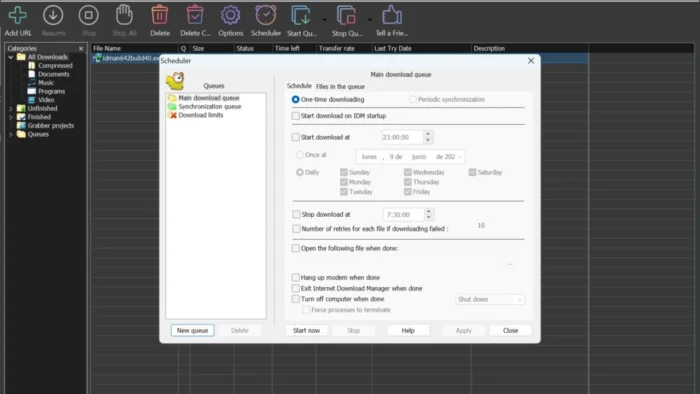
- Queues and a scheduler
- Grab media from many web players, within what the site allows
It is a maintenance build in the long 6.43 line, not a new product.
Questions before you trust the .exe
Is this the official file?
Yes if it came from internetdownloadmanager.com and the publisher is Tonec.
Is IDM free?
For 30 days. After that you buy a licence or uninstall. There is no permanent free tier.
Do I download a Pro edition?
No. Same installer. Serial from Tonec.
Will it make every download 5× faster?
Only if the server and your line have spare capacity. Many sites limit you on purpose.
Safe?
The official file is the safe path. Crack sites are the usual problem with this product, not the genuine installer.
Work PCs?
Buy the right number of licences. Do not share one home key across a company.
After you have the file
Install from Tonec. Add the browser extension. Use the 30 days. Pay on the official shop if the queue is worth a key.
Official site: www.internetdownloadmanager.com
Download: www.internetdownloadmanager.com/download.html
Register: the shop linked from that site
Publisher: Tonec Inc. Internet Download Manager is their product. Report a page that wrapped this installer in a crack.
Overview
IDM is a dedicated download manager for Windows that takes over file downloads from your browser, using connection management and file segmentation to make the process faster and more resilient to interruptions.
- Developer: Tonec Inc.
- Purpose: Faster, more reliable, and better-organized file downloading
- Main workflow: Browser detects a downloadable file → IDM intercepts it → file is segmented and downloaded via multiple connections → organized into categorized folders
- Licensing: Free trial, with a paid license required for continued use
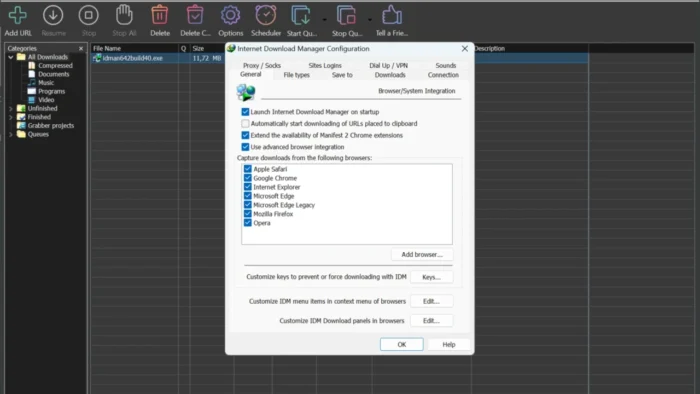
- Browser support: Chrome, Edge, Firefox, Opera, and other Chromium-based browsers
- Major strength: Genuinely reliable download recovery — resuming a broken download rather than restarting from zero — combined with tight browser integration
How IDM Actually Speeds Up Downloads
It’s worth being precise about what IDM does and doesn’t do, since this is a common point of confusion. IDM cannot exceed the maximum speed your internet connection provides — no download manager can. What it does instead is use dynamic file segmentation: instead of pulling an entire file through a single connection, it splits the file into multiple sections and downloads them simultaneously.
This approach can:
- Use available bandwidth more efficiently across the download
- Reduce total completion time, especially for large files on servers that support multiple simultaneous connections
- Improve stability if one segment stalls, without derailing the whole download
Actual results still depend on your internet speed, the hosting server’s performance, current network conditions, and any limits the file host itself imposes.
Key Features
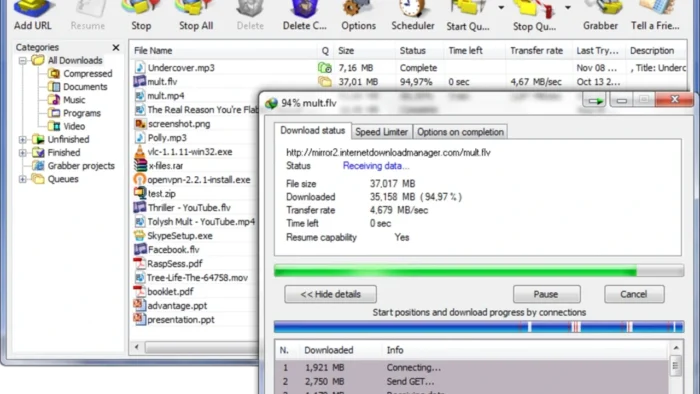
- Download Acceleration – Connection management and dynamic segmentation genuinely speed up completion time on large installers, high-quality videos, backups, and archives, particularly on servers that allow multiple simultaneous connections.
- Resume Broken Downloads – Recovers downloads interrupted by network drops, unexpected shutdowns, or temporary server issues, picking back up from where the download stopped rather than starting over — arguably IDM’s single most valuable feature for large files.
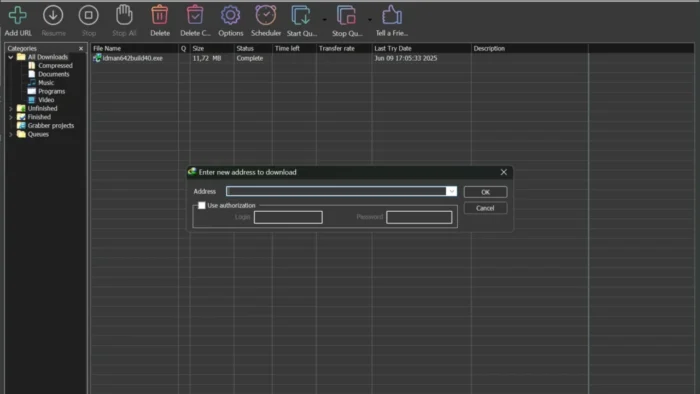
- Browser Integration – Automatically detects downloadable content in Chrome, Edge, Firefox, Opera, and other Chromium-based browsers, capturing links directly into IDM’s queue without manual copy-pasting.
- Video Download Detection – Identifies downloadable video content on supported sites and offers download options directly through browser integration, useful for saving tutorials or educational content for offline viewing (always within the site’s own terms and applicable copyright rules).
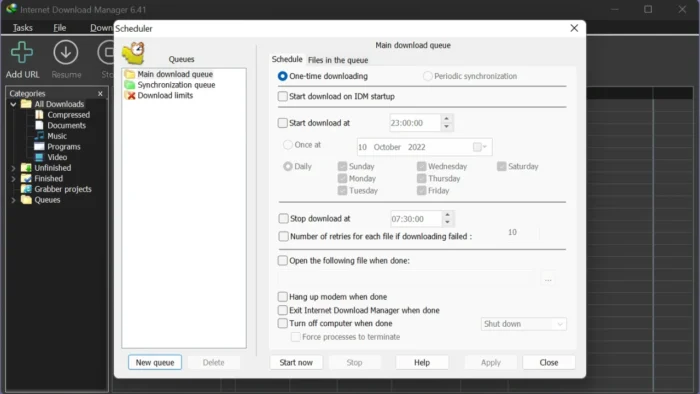
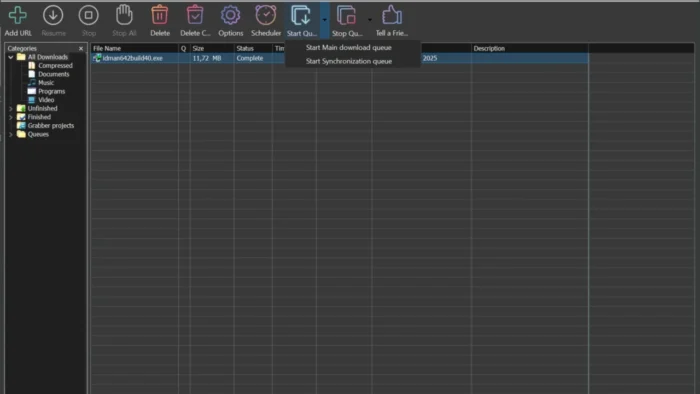
- Download Scheduler – Queue downloads to start and complete at specific times, useful for running large batches overnight or managing bandwidth usage during work hours.
- Batch Download Management – Add, queue, and prioritize multiple files at once, which matters a lot if you regularly need to grab a whole set of files rather than one at a time.
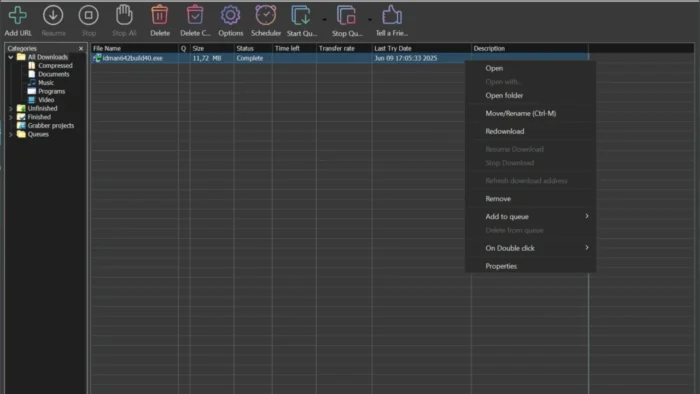
- Automatic File Categorization – Sorts completed downloads into categories like documents, programs, videos, music, and compressed files, with customizable folder rules if you want a different organization scheme.
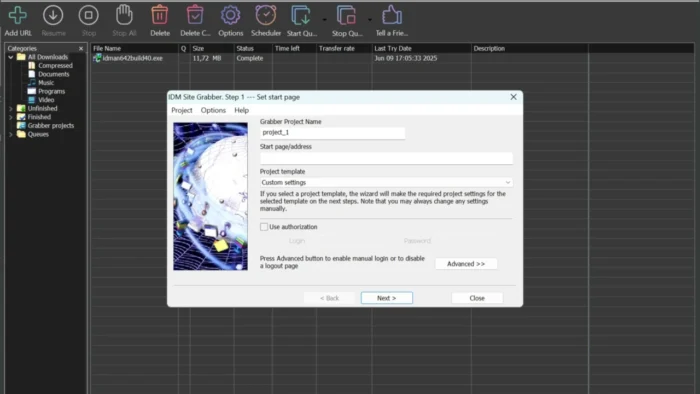
- Site Grabber – Downloads permitted content from a specified website based on your own defined rules, useful for archiving resources you’re allowed to save for offline access.
User Interface
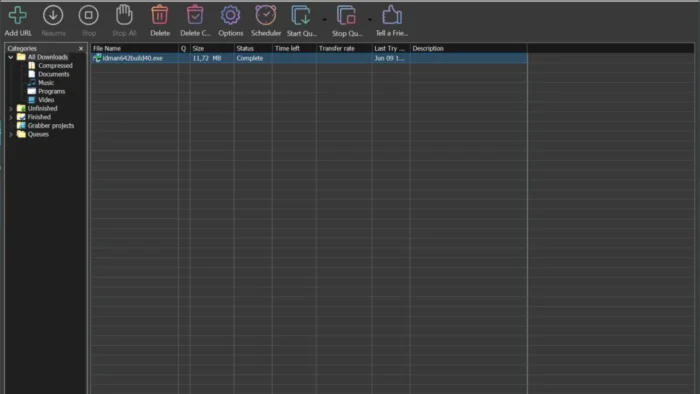
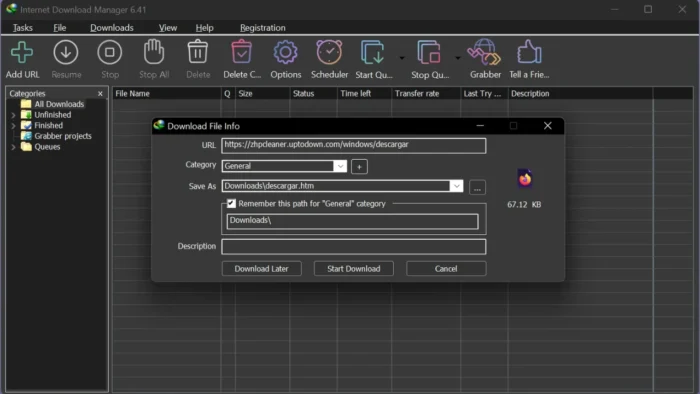
IDM’s interface centers on a straightforward dashboard: active downloads, completed downloads, categories, scheduler, and queue management, all visible without digging through menus. New users can start downloading immediately without configuration, while more advanced users can adjust connection counts, scheduling rules, and organizational settings as needed.
IDM vs Browser Downloads
| Feature | Web Browser | IDM |
|---|---|---|
| Basic downloads | Yes | Yes |
| Download resume | Yes, depending on server | Yes, for supported downloads |
| Download scheduling | Limited | Yes |
| Download queues | Limited | Yes |
| Download categories | Basic | Yes |
| Download acceleration | Browser-dependent | Multi-segment downloading |
| Browser integration | Built-in | Available for supported browsers |
| Advanced download management | Limited | Yes |
For occasional, small downloads, your browser’s built-in tool is generally sufficient. For frequent or large downloads, IDM’s queuing, recovery, and organization tools offer real, tangible advantages.
How to Install IDM
- Download the IDM installer from the official Tonec website.
- Open the downloaded setup file.
- Follow the on-screen installation instructions.
- Enable browser integration when prompted.
- Complete the setup process.
- Restart your browser if required for integration to take effect.
Once installed, IDM automatically manages supported downloads going forward.
Registering IDM Legally
IDM operates on a trial-then-purchase model. After buying a license from Tonec, you’ll receive a serial number and registration details by email, which you enter directly inside the application:
- Copy the serial number exactly from your purchase email.
- Open IDM. If there’s no desktop shortcut, the executable is typically located at
C:\Program Files\Internet Download Manager(orC:\Program Files (x86)\Internet Download Manageron some Windows configurations). - From the menu bar, go to Registration > Registration.
- Enter your First Name, Last Name, Email, and Serial Number exactly as provided during purchase.
- Click OK — IDM will verify the details with Tonec’s servers and confirm registration.
If registration fails: double-check for accidental extra spaces copied along with the serial number, and watch for easily confused characters like 0 (zero) vs. O (letter O), or 1 (one) vs. I (letter I). Confirm your name and email match exactly what was used at purchase.
To verify registration succeeded: the Registration menu option will appear greyed out and unclickable, or you can check Help > About IDM to confirm it shows “FULL” rather than a trial designation.
Keep your registration details backed up somewhere secure (a password manager, encrypted note, or private cloud storage) — you’ll need them again if you reinstall Windows or IDM itself. If you lose them, Tonec’s official registration recovery page can help retrieve your details.
Advantages of IDM
- Fast, reliable download management with genuine acceleration benefits
- Strong recovery for interrupted downloads, avoiding restarts on large files
- Deep browser integration across major browsers
- Flexible scheduling for bandwidth and timing control
- Automatic file categorization keeps downloads organized without manual sorting
- Simple interface that’s approachable for new users but configurable for advanced ones
- Solid batch download and queue management for handling many files at once
Limitations
- Windows-only — no native macOS or Linux version
- Requires a paid license after the trial period ends
- Not built for torrent/P2P downloading
- Some websites restrict or block download-manager integration, limiting effectiveness there
IDM Alternatives
Free Download Manager – A free alternative offering download acceleration, file management, and torrent support, suitable for users who want a no-cost option with broader protocol support.
JDownloader – Built around managing large numbers of links and downloads, with strong batch downloading, link management, and automation features for users handling frequent, high-volume downloads.
Browser Download Managers – Fine for small, occasional downloads, but generally lacking the scheduling, queuing, and recovery depth that a dedicated tool like IDM provides.
Is IDM Safe?
The genuine IDM application, downloaded from Tonec’s official site or another trusted, verified source, is safe to use. The real risk comes from unofficial, modified installers circulating elsewhere — these can bundle unwanted software or introduce real security risks, and they won’t receive legitimate updates or support.
Good practice: download only from official or clearly trusted sources, keep IDM updated, and be cautious of any installer that seems to come bundled with unrelated software during setup.
Frequently Asked Questions
Is IDM free? IDM offers a free trial period; continued use after that requires a paid license purchased from Tonec.
Does IDM work on Windows 11? Yes, it supports modern Windows versions, including Windows 11, alongside Windows 7, 8/8.1, and 10.
Can IDM increase my actual internet speed? No — it can’t exceed your connection’s maximum speed. It optimizes how that available bandwidth is used through segmented, multi-connection downloading, which can meaningfully reduce completion time on supported servers.
Can IDM download videos? It can detect downloadable video content on supported sites and offer download options through browser integration. Always respect copyright and the hosting site’s own terms when doing so.
Is IDM better than using my browser’s built-in downloader? For frequent or large downloads, yes — IDM offers better organization, resume support, scheduling, and queue management. For occasional small downloads, a browser’s built-in tool is usually sufficient.
What happens if my download gets interrupted? IDM can resume many interrupted downloads from where they stopped, rather than requiring a full restart, provided the source server supports resumable downloads.
Does IDM support torrents? No, it’s built for standard HTTP/HTTPS and FTP downloads, not torrent/P2P protocols.
Is it safe to download IDM? Yes, when downloaded from Tonec’s official site or another verified, trusted source. Avoid modified installers from unofficial sites.
Final Verdict
Internet Download Manager remains one of the most complete download management tools available for Windows, and its combination of connection-based acceleration, reliable interrupted-download recovery, deep browser integration, and file organization genuinely earns its long-standing popularity. Anyone who regularly downloads large installers, archives, or videos will notice the difference over relying on a browser alone.
Casual users who only download the occasional small file may not need it, but for anyone handling frequent or large downloads, IDM’s scheduling, queuing, and recovery tools offer real, practical value — and its simple interface keeps that power approachable rather than overwhelming.