

IObit Driver Booster Pro 14.0.1.462
IObit Driver Booster Pro Download for Windows
Outdated or missing drivers are one of the most common — and most invisible — causes of a sluggish, crash-prone PC.
Most people don’t realize a graphics driver from two years ago is quietly holding back frame rates, or that a flaky network adapter driver is behind those random Wi-Fi drops, because manually tracking down the right driver means digging through manufacturer sites and hoping you picked the correct version.
IObit Driver Booster exists specifically to remove that guesswork.
It scans your entire system, identifies outdated, missing, or faulty drivers, and updates them from a certified database with a single click. On Windows, it’s become one of the most widely used driver-update tools largely because of what it gets right: safety (every driver is WHQL-verified), coverage (over a thousand hardware brands), and a genuine focus on gaming performance through dedicated Game Ready driver support.
Whether you’re troubleshooting random hardware glitches or just want your GPU running the latest driver for a new game release, Driver Booster is built to handle it without the manual hunting.
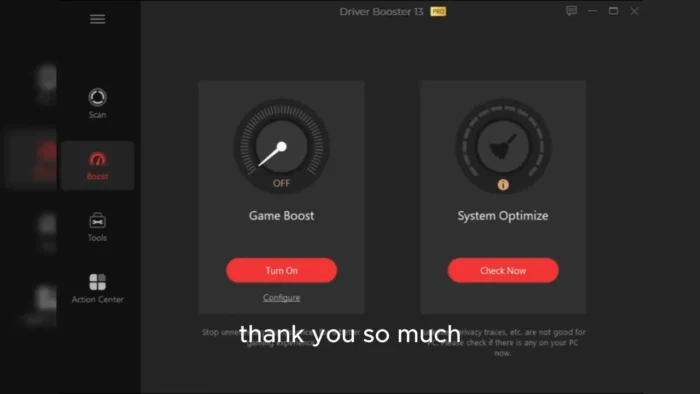
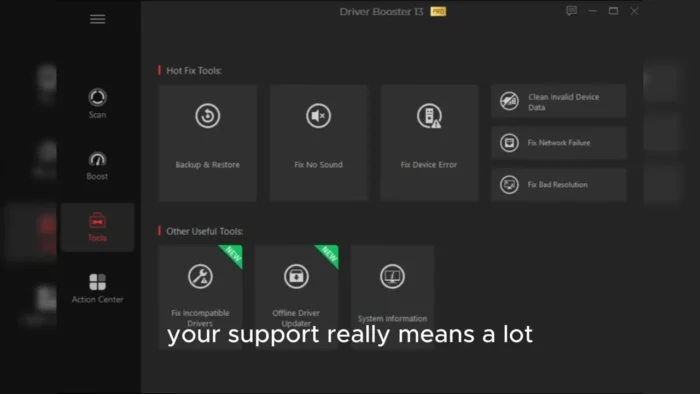
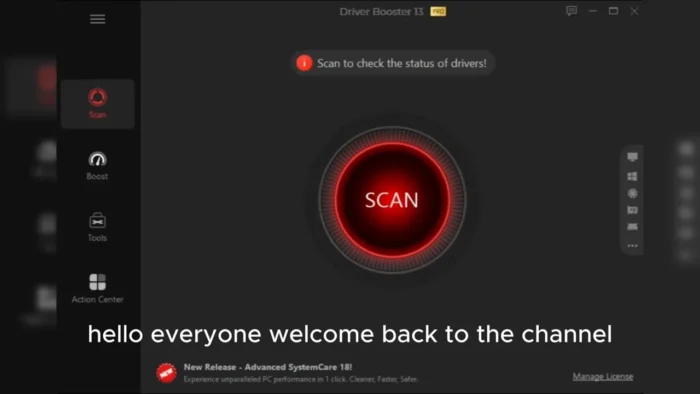
Driver Booster Pro is a real IObit plan. The Windows file is still one official installer. Same rule as before: take the file from IObit, not a “Pro unlocked” pack.
Download Driver Booster for Windows
Official download from IObit.
Scan outdated, missing and broken drivers. Install Free. Unlock Pro with a licence from IObit, not a crack.
Download Driver Booster for Windows
Windows 11/10/8.1/8/7 · ARM64 supported · Version 14 · Installer (.exe) · Free, with optional Pro subscription.
Official IObit build. Filename: driver_booster_setup.exe
Get it from iobit.com or the publisher’s download host (cdn.iobit.com/dl/driver_booster_setup.exe). Do not collect DriverBoosterPro_Full.exe from a mirror.
This is the installer for most PCs. Free and Pro are the same programme. Pro is a key, not a second engine.
Privacy · Free vs Pro · Need another language?
If you searched for “Driver Booster Pro”
Pro is official. It is not a separate setup.
- Download the official installer.
- Scan for free.
- Buy Pro on iobit.com if you want the extra tools.
- Enter the key in the app.
A pre-activated “Pro 14 lifetime” zip is not from IObit.
Your download should start on the official site
If nothing saves, use the Free Download button on IObit’s Driver Booster page again.
What to do next
- Open
driver_booster_setup.exefrom Downloads. - If Windows asks, choose Yes. Publisher should read IObit.
- Untick extra IObit apps if setup offers them.
- Finish install, run a scan, then update one driver first — not the whole list at once if you are unsure.
Typical folder: C:\Users\You\Downloads.
You need the internet. The installer is small. The drivers it fetches are not.
Windows may warn you. Check the publisher.
New IObit builds sometimes trip SmartScreen.
- Windows protected your PC → More info → confirm IObit → run only if that matches.
- Do not turn off antivirus to “activate Pro.”
- Do not run Patch, Keygen, or Activator.
Windows Update already supplies many drivers. Use Driver Booster if you want IObit’s catalogue and one-click flow. Create a restore point before a big batch. Pro can back up drivers; Free is thinner there.
Pick the right Windows file
One recommended file. Pro is not another download.
| Build | Who it is for | File |
|---|---|---|
| Recommended | Windows 11/10, Intel or AMD | driver_booster_setup.exe from iobit.com |
| Same installer, ARM PC | Windows 11/10 on ARM | Same official file |
| Pro | Same app + paid key, usually 1 year / 3 PCs | Buy on iobit.com, then activate |
| Free only | Scan and limited updates forever | Same installer, do not enter a key |
There is no official “offline Pro suite” that is 200 MB and already licensed. Offline driver install after a network loss is a Pro feature inside the app, not a pirate pack.
Free vs Pro
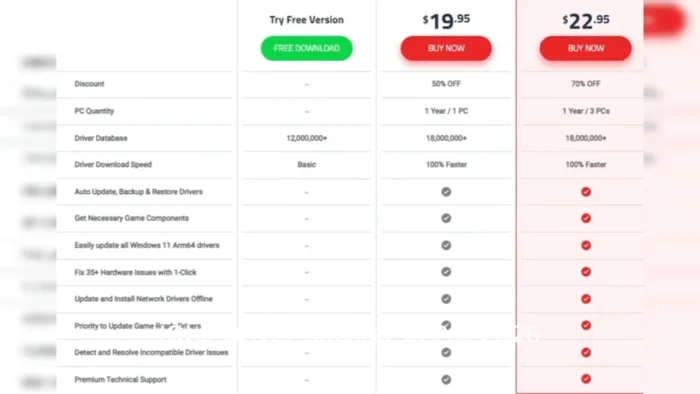
Promo prices move. Current official compare page lists Pro around $22.95 for 1 year / 3 PCs against a higher list price. 60-day money-back on paid plans. Free stays free, with limits.
| Free | Pro | |
|---|---|---|
| Scan outdated / missing / faulty drivers | Yes | Yes |
| Driver set IObit advertises | About 12 million | About 18 million |
| Download speed | Capped | Uncapped |
| Update while the PC is idle | No | Yes |
| Backup several driver versions | Limited | Yes |
| Offline network-driver install | No | Yes |
| One-click Windows 11 ARM64 driver update | No | Yes |
| Game Ready / game component priority | Limited | Yes |
| Fix 35+ device errors (sound, network, and similar) | No | Yes |
| App updates | Manual | Automatic |
| Support | Community | 24/7 on demand |
Will it run on this PC?
- OS: Windows 11, 10, 8.1, 8, 7. IObit still lists Vista and XP; those systems are long out of Microsoft support.
- ARM: Windows 11/10 ARM64 is supported.
- Disk: about 1 GB free for driver downloads, not just the 32 MB setup.
- Screen: 1024×768 or higher.
- Admin: required.
- Already installed? This file updates it. A genuine Pro key stays in the app.
Install, first run, and the Pro nag
Typical path: C:\Program Files (x86)\IObit\Driver Booster
First run
- Let it scan.
- Read the list. GPU, chipset and network first if you need those.
- Do not tick every optional IObit extra in the shop tabs.
- Restart when the app asks after graphics or chipset drivers.
Free keeps scanning. Pro tools sit behind a yearly plan. That reminder is the product, not a broken install.
Uninstall: Settings → Apps → Driver Booster → Uninstall.
If leftover folders remain, that is common with this publisher. Remove them only if you know what they are.
If it did not work
- Download never started — use iobit.com, not an ad button.
- File is huge and named
Pro_Crack— leave. - Extra toolbar or Uninstaller/Defrag appeared — you left a box ticked in setup.
- PC will not boot after a batch update — use the restore point or Pro’s driver backup. Next time, update fewer devices per pass.
Why people install it
- One list of outdated drivers instead of each vendor site
- Game Ready drivers and runtime components in the same window
- A backup before the swap, if you are on Pro
It will not replace a clean Windows install, and it is not a licence to ignore Windows Update.
What’s new in version 14
- More Game Ready drivers called out for current titles
- Scan and install engine tweaks
- UI text fixes and bug fixes
14.x also added a larger driver set, faster scan claims, ARM64 driver updates, and a newer interface. Full notes live on IObit’s product pages.
Questions before you trust the .exe
Is this the official file?
Yes if it is driver_booster_setup.exe from iobit.com / cdn.iobit.com.
Do I download Pro separately?
No. Same installer. Buy the key from IObit.
Is Pro lifetime?
No. It is a subscription, commonly one year on three PCs. Major version jumps can sit outside a cheap yearly deal. Check the EULA on the shop page.
Will it change my drivers without asking?
Free is mostly manual. Pro can update while the PC is idle if you leave that on.
Safe?
IObit says drivers are WHQL-checked and reviewed. Still verify the publisher on the installer, decline bundles, and keep a restore point. Third-party driver tools are a trust decision. Windows Update is the conservative path.
Work PCs?
Read the licence. Home keys are not a site licence.
Windows 7 / XP?
The publisher still lists them. Microsoft does not support those systems. Prefer a current Windows PC.
After you have the file
Install from IObit. Scan. Update with a restore point ready. Pay only on iobit.com if Pro’s extra database, speed and backups are worth a year.
Official product: www.iobit.com/en/driver-booster.php
Free vs Pro: www.iobit.com/en/compare/db/
Shop and refund terms: the purchase pages linked from those.
Publisher: IObit. © 2026 IObit. Report a page that wrapped this installer in a crack.
Overview
Driver Booster is a dedicated driver-scanning and updating utility for Windows, built around a large, certified driver database rather than requiring manual manufacturer-by-manufacturer searching.
- Developer: IObit
- Purpose: Detect and update outdated, missing, or faulty device drivers
- Main workflow: Scan your system → review detected outdated/missing drivers → update individually or in bulk → restart if required
- Licensing: Free version available, with a Pro (paid) edition unlocking additional features
- Major strength: A massive, WHQL-certified driver database combined with dedicated gaming-focused driver support (Game Ready drivers, DirectX, and other game components)
Key Features
- Automatic System Scanning – Continuously or on-demand scans your entire hardware setup to identify outdated, missing, or faulty drivers, removing the guesswork of figuring out what actually needs updating.
- Massive, Certified Driver Database – Covers over 1,200 major hardware brands, including Intel, AMD, and NVIDIA, spanning graphics cards, audio chipsets, network adapters, motherboards, printers, and other peripherals.
- Two-Step Driver Verification – Every driver is checked against Microsoft’s WHQL (Windows Hardware Quality Labs) certification and an additional IObit security scan before being offered, which matters a lot given how sensitive driver-level software is to system stability.
- Game Ready Driver Support – Actively tracks and supports drivers optimized for specific new game releases, aimed at smoother frame rates, faster load times, and fewer crashes in recently released titles.
- One-Click Bulk Updating – Update every outdated driver detected in a scan with a single action, rather than manually approving and installing each one individually.
- Driver Backup and Restore – Creates restore points or backups before applying updates, so you can roll back if a specific driver update causes an unexpected issue — a genuinely important safety net for driver-level changes.
- Offline Driver Updater (Pro) – If a broken network driver leaves your PC offline entirely, this tool lets you extract your hardware information, download the correct driver on a different connected machine, and apply the fix without needing an active connection on the affected PC.
- Game and Component Optimization – Beyond GPU drivers, it also helps keep supporting components like DirectX, PhysX, and OpenAL current, which affects overall gaming compatibility and performance beyond the graphics driver alone.
- Windows ARM64 Support – Extends driver coverage to modern ARM-based Windows devices, not just traditional x86 systems.
- Simple, Accessible Interface – A clean dashboard that’s approachable for users with limited technical background, while still surfacing enough detail for more experienced users who want to review what’s being changed.
Free vs Pro
| Feature | Free Version | Pro Version |
|---|---|---|
| Driver scanning | Yes | Yes |
| Manual driver updates | Yes | Yes |
| Automatic background updates | No | Yes |
| Full driver database access | Limited | Full access |
| Download speed | Standard | Faster |
| Offline Driver Updater | No | Yes |
| Automated backup | Limited | Yes |
| Technical support | Limited | Priority support |
The free version covers the core scanning and manual updating experience well. Pro is worth considering if you want automatic background updates, faster downloads, and the Offline Driver Updater specifically.
System Requirements
| Component | Requirement |
|---|---|
| Operating System | Windows 7, 8/8.1, 10, or 11 (32-bit/64-bit) |
| Processor | 1 GHz or faster |
| RAM | 1 GB minimum (2 GB or more recommended) |
| Storage | Around 30–40 MB for installation, plus space for downloaded drivers |
| Internet | Required for scanning and downloading driver updates |
How to Install
- Download the Driver Booster installer from IObit’s official website.
- Run the downloaded setup file.
- Follow the on-screen installation instructions.
- Launch Driver Booster once installed.
- Run a scan to detect outdated, missing, or faulty drivers.
- Review the results and update drivers individually or all at once.
- Restart your PC if prompted, especially after major driver updates like graphics drivers.
Pros
- Large, genuinely certified driver database covering a huge range of hardware brands
- WHQL certification plus IObit’s own security scan adds real safety assurance
- Strong focus on gaming performance through Game Ready driver support
- Backup and restore functionality protects against problematic updates
- Simple interface that’s approachable for non-technical users
- One-click bulk updating saves significant time over manual driver hunting
Cons
- Some of the most useful features (automatic updates, offline updater, faster downloads) are locked behind the paid Pro version
- Free version’s driver database access is more limited than Pro
- Occasionally flags drivers as outdated when the currently installed version is already stable and sufficient, so it’s worth reviewing before blindly updating everything
- Driver updates in general carry some inherent risk of compatibility issues, though backup/restore mitigates this
Frequently Asked Questions
Is IObit Driver Booster free? Yes, a free version is available with core scanning and manual update features. Driver Booster Pro is a paid upgrade with additional automation and features.
Does Driver Booster support Windows 11? Yes, it supports Windows 7 through Windows 11, including ARM64 devices.
Are the drivers from Driver Booster safe? Yes, drivers in its database are WHQL-certified by Microsoft and additionally scanned by IObit before being made available.
Can Driver Booster fix gaming performance issues? It can help by keeping GPU drivers and supporting components like DirectX and PhysX current, which often does improve stability and performance — though results vary depending on your specific hardware and the game in question.
What’s the difference between the free and Pro versions? Pro adds automatic background updates, faster download speeds, the Offline Driver Updater tool, full database access, and priority support.
Does Driver Booster back up my existing drivers before updating? Yes, it creates backups/restore points so you can revert if an update causes issues.
Can I use Driver Booster if my network driver is broken? Yes, if you have Driver Booster Pro — the Offline Driver Updater lets you extract hardware info, download the correct driver on another PC, and apply it without needing an active connection on the affected machine.
Is an internet connection required to use Driver Booster? Yes, for scanning against the online driver database and downloading updates.
Final Verdict
IObit Driver Booster solves a genuinely common problem — the tedious, error-prone process of manually finding and installing the right drivers for a wide range of hardware. Its certified driver database, backup/restore safety net, and dedicated gaming optimizations make it a strong choice for anyone dealing with driver-related instability or wanting to keep their GPU driver current for new game releases.
The free version is a solid starting point for occasional manual updates, but frequent users — especially gamers who want automatic updates and the Offline Driver Updater — will get more out of the Pro version. Either way, Driver Booster remains one of the more reliable, well-established driver management tools available for Windows.