

Lightburn 2.2.00
LightBurn is LightBurn Software’s laser design / send app (GCode, DSP, Galvo). The software supports compatible laser controllers and is available for supported operating systems. Official: lightburnsoftware.com/pages/download-trial and release.lightburnsoftware.com. A 30-day trial is available, followed by a licence key (Core vs Pro depending on controller compatibility). “LightBurn unlocked” is not an official edition. This is not RDWorks. Lasers can burn and blind — keep interlocks enabled, use goggles rated for the laser’s wavelength, and never install patches that disable safety features. Operating system and 32-bit compatibility vary by release; check the official documentation for legacy system support.
Screenshots
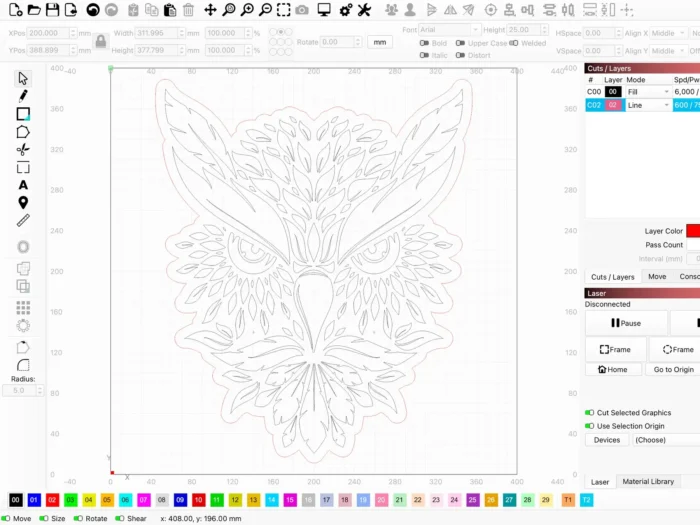
Download LightBurn for Windows
Official download from LightBurn Software.
Get the Windows installer compatible with your system. Add your laser. Enter a genuine licence key after the trial if you decide to purchase a licence.
Download LightBurn for Windows
Compatible Windows versions · Supported system architecture · 30-day trial
Trial: Download / Trial.
Install docs: Install LightBurn.
Older builds: How to downgrade.
Do not run files labelled LightBurn_Unlocked.exe. Such files are not official LightBurn installers simply because they use the LightBurn name.
Shop PCs: purchase the required additional licences from LightBurn. Do not share a licence beyond its permitted terms.
Install LightBurn · Need a legacy version? · Already licensed?
If you searched for a full version, a Pro portable edition, or an activated download
There is no need for an unofficial unlocked setup.
- Download from lightburnsoftware.com
- Install the official application
- Add your device (GCode / Ruida / galvo)
- Open Help → Licence and enter your own key
An unofficial pre-activated folder or patched LightBurn.exe may involve unauthorised licensing or malware. Grey-market keys can be unreliable or associated with reused licences.
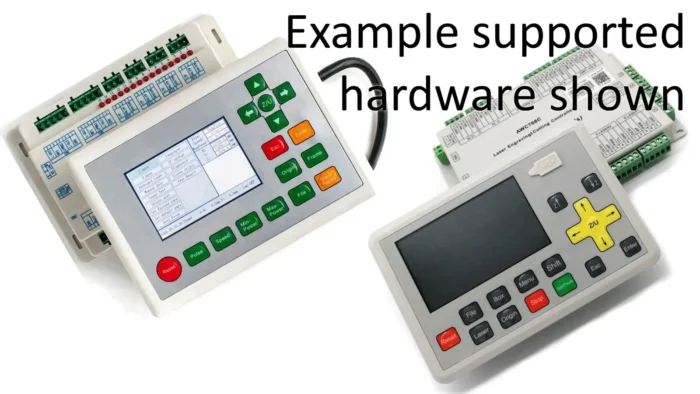
Core is intended for supported GCode controllers, including many GRBL-class devices. Pro supports additional controller families, including compatible DSP and galvo systems. Check the official licence comparison for your controller before purchasing. Do not attempt to unlock features with a patch.
Your download should start on lightburnsoftware.com
If an installer comes from an unofficial source or is presented as a cracked LightBurn download, leave the page. File size alone cannot establish whether an installer is genuine.
What to do next
- Open Download / Trial and select the Windows installer compatible with your PC.
- Run the installer and install any required drivers using the official setup instructions for your controller.
- Open LightBurn → Add laser.
- If a diode laser needs a CH340 driver, obtain it from the official WCH source.
- Frame the job and check the work area before engraving.
Typical folder: C:\Program Files\LightBurn.
Driver helper locations can vary by installation and release. Follow LightBurn’s official installation instructions.
Windows N editions may require the appropriate Media Feature Pack if a supported feature depends on Windows media components.
For 32-bit Windows or older operating systems, check LightBurn’s official archive and compatibility documentation for a suitable legacy release.
Windows may warn you. Check the publisher.
- Verify the publisher and digital signature where available.
- SmartScreen may appear on a downloaded setup. Verify that the installer came from an official LightBurn source before proceeding.
- Do not turn off Defender to “unlock Pro.”
- Check the USB cable, controller connection and correct COM port. Disconnect other CH340 devices while troubleshooting if necessary.
Pick the right Windows file
| Product | What you get | Who it is for |
|---|---|---|
| LightBurn for Windows | Current compatible application | This page |
| Legacy release | Compatibility with certain older systems | Older PCs |
| 32-bit legacy release | Support for certain older 32-bit systems | Compatible legacy PCs |
| RDWorks / LaserGRBL | Other laser control software | Other vendors or projects |
Not this download
- Cracked or modified LightBurn editions
- macOS DMG on this Windows page
- Android APK
Trial and licence
30 days free. Then purchase Core or Pro through lightburnsoftware.com, depending on your controller and required features. Software updates may be subject to a defined update period; the terms of your licence determine which releases you can use and access. Check your LightBurn account for renewal and upgrade options.
An unusually cheap “Pro lifetime” key from an unofficial seller may not be a legitimate LightBurn licence.
Will it run on this PC?
System requirements vary by LightBurn release and operating system. Check the official documentation for supported Windows versions, processor architecture, memory and display requirements. A modern 64-bit Windows PC with sufficient RAM, a suitable display and a reliable connection to your laser controller is recommended. Additional CAD software or complex projects may require more resources. Galvo and EzCad-compatible equipment may need specific drivers and supported controller hardware.
| What to check | Practical recommendation | |
|---|---|---|
| OS | Supported Windows versions | A compatible, supported Windows installation |
| RAM | Requirements for your release and projects | Enough memory for your design workload |
| Screen | Supported display resolution | A comfortable workspace for accurate design |
| Connection | Compatible controller and drivers | A reliable USB or supported controller connection |
Already installed? Use LightBurn’s official update instructions to check for a compatible release. You do not need a separate “Pro full” download.
Install, first job, and safety
First run
- Add the correct controller type.
- Test the frame function on scrap material or a suitable test area.
- Use appropriate settings for your material and laser, following the machine manufacturer’s safety instructions.
- Enter your licence key if you purchased a licence.
- Never bypass the lid switch or other safety interlocks because a forum suggests it.
Uninstall: Settings → Apps.
If it did not work
- Trial ended — check the available licence options.
- No COM port — check the USB connection, driver and controller settings.
- An unofficial “LB Unlocked” installer — leave the page.
Why shops still buy official LightBurn
- One interface for many compatible laser controllers
- Documentation and support for compatible releases
- A trial before purchasing a licence
It will not make an unsafe laser head safe.
Questions before you trust the installer
Is this the official file?
Download directly from lightburnsoftware.com/pages/download-trial or the official release.lightburnsoftware.com site.
Core vs Pro?
The appropriate licence depends on your controller family and required features. Check LightBurn’s official licence information before purchasing.
Safe?
Use the official LightBurn installer and verify its source. Unofficial “full” downloads can pose security risks. The laser itself is a physical hazard and requires appropriate protective measures.
After you have the file
Install LightBurn from lightburnsoftware.com/pages/download-trial. Activate a genuine licence if you purchase one. Frame the job, check the work area and follow all laser safety procedures before engraving.
Install: LightBurn installation guide
Licence: How the licence works
Publisher: LightBurn Software. LightBurn is their product name. Report a page that repackages this installer with a crack.