

IObit Advanced SystemCare Pro 20.0.1.256
IObit Advanced SystemCare Pro is the one-click cleaner / tuner. Free and Pro share an installer. Ultimate is a different SKU (adds IObit’s security tools). “ASC Pro portable” is not an official IObit edition. Uncheck extras during setup. It is not a substitute for Windows Update or a reliable antivirus.
Screenshots
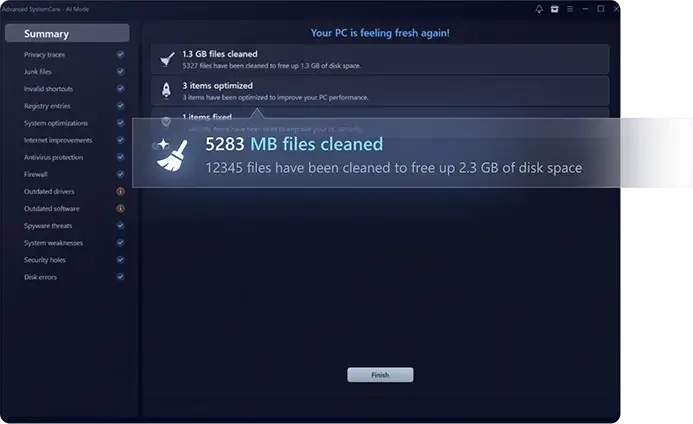
Download IObit Advanced SystemCare Pro for Windows
Official download from IObit.
Junk clean, startup trim, privacy sweep, optional scheduled “care.” You install from iobit.com, then enter a Pro key. Do not let it modify the registry extensively on day one.
Download Advanced SystemCare Pro for Windows
Compatible Windows versions · Free basics · Pro unlocks additional features
Official: iobit.com → Advanced SystemCare.
Pro page: advancedsystemcareprony.
Manual: asc-help.
Do not run ASC_Pro_Unlocked.exe. That is not an official IObit installer.
Work PCs: buy the number of licences required for your PCs. Administrator rights may be required.
Install Free · Need Pro? · Already licensed?
If you searched for an older full version, a portable edition, or an activated download
There is no need for an unofficial unlocked setup.
- Download from iobit.com
- Choose a custom installation. Uncheck bundled IObit apps
- Open Advanced SystemCare
- Enter the Pro key
- Create a restore point before using Deep Clean / registry tools
An unofficial pre-activated archive may involve unauthorised licensing or malware. Grey-market keys can be unreliable or associated with reused licences.
Your download should start on iobit.com
If an installer comes from an unofficial source or is presented as a cracked Advanced SystemCare download, leave the page. File size alone does not establish whether an installer is genuine.
What to do next
- Open Advanced SystemCare on iobit.com.
- Download the Windows installer.
- Choose a custom installation. Decline unwanted extras.
- Launch the program. Open My Subscription to enter your key, if applicable.
- Run one junk clean. Read the list before deleting files or changing settings.
Typical folder: C:\Program Files (x86)\IObit\Advanced SystemCare. The actual location may vary depending on your Windows installation and setup choices.
Use the in-app updater or IObit’s official website to check for updates. If your licence has version restrictions, check the applicable terms with IObit.
Ultimate is a separate edition that combines Advanced SystemCare features with additional IObit security tools. Check its official product page for the current feature set.
Windows may warn you. Check the publisher.
- Publisher should read IObit.
- SmartScreen can appear on a downloaded setup. Verify the digital signature and publisher before proceeding.
- Do not turn off Defender because Advanced SystemCare claims to provide protection.
- Administrator rights may be required for certain features.
Watch installer checkboxes. This helps prevent unwanted bundled apps, such as Driver Booster or Uninstaller, from being installed.
Pick the right Windows file
| Product | What you get | Who it is for |
|---|---|---|
| ASC Free | Basic cleaning tools | First look |
| ASC Pro | Additional tools and scheduled features | This page |
| ASC Ultimate | Pro features + additional security tools | Different SKU |
| CCleaner | Other vendor | Other download |
| Uninstaller Pro | Remove apps | Sister product |
Not this download
- Unofficial modified or pre-activated Pro packages
- Driver Booster labelled as Advanced SystemCare
- Third-party lifetime offers that cannot be verified with IObit
Trial and licence
Free works without a key. Pro is a paid upgrade, with subscription and other licence options depending on current availability and region. Open My Subscription to check your licence status. Cancel through the applicable IObit account or purchase channel if you only wanted to try a subscription.
An unusually cheap “ASC Pro lifetime” key from an unofficial seller may not be a legitimate IObit licence.
Will it run on this PC?
System requirements can vary by release and feature. Check IObit’s official manual for supported Windows versions, available disk space, display requirements and administrator permissions. Use a supported Windows system and keep Windows components up to date. Avoid unnecessary registry changes and leave essential Windows components alone.
| What to check | |
|---|---|
| OS | A Windows version supported by the installed release |
| Disk | Available installation space |
| Screen | Supported display resolution |
| Rights | Administrator permissions where required |
Already installed? Use the in-app updater or official IObit website to check for updates. You do not need a separate “Pro full” download.
Install, first clean, and Pro check
First run
- Open Advanced SystemCare.
- Activate Pro if you purchased a licence.
- Scan. Review the detected junk — do not select every registry entry automatically.
- Restart if requested.
- Turn off aggressive automatic care until you understand its effects.
Uninstall ASC: Settings → Apps.
If it did not work
- Key rejected — check whether you installed the correct edition and whether the licence is valid.
- PC feels worse — use a restore point if needed and disable automatic optimisation.
- An unofficial “ASC Unlocked” installer — leave the page.
Why people still install Pro
- One-click junk cleaning + startup management
- Using an IObit account across supported IObit products
- Scheduled cleaning if you prefer that approach
It will not fix a failing disk or replace Windows Security.
Questions before you trust the installer
Is this the official file?
It is more likely to be official if it came directly from iobit.com and the publisher and digital signature are verified.
Is Pro free?
No. The free edition has a more limited feature set.
Which version should I download?
Use the Windows edition currently offered on IObit’s official website. Check the licence terms if you need a specific release.
Safe?
Use the official IObit installer and verify its publisher. Unofficial “ASC Pro full” files can pose security risks.
After you have the file
Install from IObit. Decline unwanted extras. Enter your Pro key if you purchased a licence. Check for updates through the app or official website.
Site: iobit.com
Pro: advancedsystemcareprony
Manual: asc-help
Publisher: IObit. Advanced SystemCare is their mark. Report a page that repackages this installer with a crack.