
Photoshop CC 2017
Adobe Photoshop CC 2017 is an older release of Adobe Photoshop for Windows. It provides professional tools for photo editing, retouching, compositing, graphic design, typography, and digital artwork. This page covers Photoshop CC 2017 features, compatibility, system requirements, and available download options for 32-bit and 64-bit Windows systems.
Photoshop CC 2017 is no longer the current version of Photoshop, but some users may still need this release for older projects, workflows, or compatibility with legacy systems. If you need a newer release, you can also see Adobe Photoshop CC 2018 or Adobe Photoshop CC 2019.
Adobe Photoshop CC 2017 Overview
Photoshop CC 2017 is part of Adobe’s Creative Cloud generation of Photoshop releases. The 2017 release introduced improvements to the search experience, document creation, Adobe Stock templates, SVG color fonts, Select and Mask, Face-Aware Liquify, Creative Cloud Libraries, and the Properties panel.
Because this is an older Photoshop release, it should be treated as a legacy version rather than a current Photoshop download. Compatibility can also depend on the exact build, Windows version, hardware, and installer architecture.
Photoshop CC 2017 Version Information
- Product: Adobe Photoshop
- Release: Photoshop CC 2017
- Release period: November 2016
- Platform: Windows and macOS releases were available
- License: Commercial/proprietary software
Important: Photoshop CC 2017 is not a free version of Photoshop and it is not the latest Photoshop release. An installer file does not remove Adobe’s licensing or activation requirements.
What’s New in Adobe Photoshop CC 2017
The 2017 release focused on making Photoshop easier to learn and improving several workflows for designers and photographers. Adobe introduced a new in-app search experience, document templates, SVG color font support, and improvements to selection, typography, libraries, and the Properties panel.
In-App Search
Photoshop CC 2017 introduced a unified search experience that lets users search for Photoshop tools, menus, documents, Help content, tutorials, and Adobe Stock content from within the application. This can make it easier to find features without navigating through multiple menus.
New Document Templates and Presets
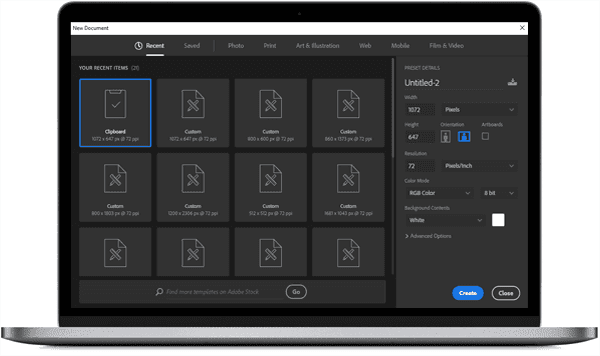
The New Document experience was expanded with templates and presets. Users could start projects from available Adobe Stock templates or create documents using custom dimensions and reusable presets instead of always starting with a blank canvas.
SVG Color Font Support
Photoshop CC 2017 added support for SVG OpenType color fonts. These fonts can contain multiple colors and gradients, making them useful for certain modern typography and design workflows.
Select and Mask Improvements
The Select and Mask workspace received several improvements, including the Polygonal Lasso tool and better preview options. These changes were intended to make detailed selections and edge refinement easier.
Face-Aware Liquify Improvements
Face-Aware Liquify was enhanced so users could adjust the eyes independently or symmetrically. This provides more control when making facial adjustments while retouching photographs.
Creative Cloud Libraries Improvements
Creative Cloud Libraries received additional capabilities for working with Adobe Stock assets and shared library content. These improvements made it easier to reuse and manage creative assets across supported Creative Cloud applications.
Properties Panel Improvements
The Properties panel was expanded to provide more information for documents and different layer types. Type-layer properties could also be adjusted directly from the panel, making some editing tasks more convenient.
Adobe XD Integration
Photoshop CC 2017 added improved interoperability with Adobe Experience Design CC, allowing designers to move supported SVG-based assets from Photoshop into Adobe XD workflows.
Adobe’s documentation for the 2016 Photoshop release also lists improvements to Match Font, text editing, Creative Cloud Files, artboard selection, and several performance and stability fixes. r2
Photoshop CC 2017 Features
- Unified in-app search
- Adobe Stock templates in the New Document experience
- SVG OpenType color font support
- Select and Mask improvements
- Face-Aware Liquify improvements
- Creative Cloud Libraries enhancements
- Improved Properties panel
- Adobe XD interoperability
- Improved Match Font functionality
- Various performance and workflow improvements
For additional historical feature information, refer to Adobe’s official Photoshop documentation.
Adobe Photoshop CC 2017 Features
Photo Editing and Retouching
Photoshop CC 2017 provides tools for photo correction, retouching, compositing, selections, masking, color adjustments, and image enhancement. Its layer-based workflow allows different elements of an image to be edited independently.
Typography and Graphic Design
Photoshop includes tools for creating and formatting text, working with shapes and paths, and combining typography with photographs and other visual elements. The CC 2017 release also introduced support for SVG color fonts.
Layer-Based Workflow
Layers, groups, masks, and adjustment layers provide a flexible way to organize complex projects. Users can edit individual elements without permanently changing the rest of the composition.
File Format Support
Photoshop supports widely used image and document formats such as PSD, JPEG, PNG, TIFF, GIF, BMP, and PDF. Available import and export options depend on the selected file format and workflow.
Photoshop CC 2017 System Requirements
Photoshop CC 2017 is an older application, so compatibility should be checked against the exact installer and Windows environment before installation. Hardware requirements can also vary depending on the specific build and features being used.
| Requirement | Information |
|---|---|
| Operating system | A supported Windows version for the specific Photoshop CC 2017 release. |
| Processor | Compatible Intel or AMD processor. |
| RAM | Memory requirements depend on the exact build and workload. |
| Storage | Free disk space is required for the application, installation files, and temporary data. |
| Display | A supported display resolution is required for the Photoshop interface. |
| Graphics processor | A compatible GPU may be required for GPU-accelerated features. |
Note: Do not assume that every modern Windows system or every older Windows release is officially supported. Check the requirements for the exact CC 2017 installer before installation.
Download Adobe Photoshop CC 2017
Photoshop CC 2017 is commercial software and is not a permanently free product. If you need this older release, choose the installer that matches your Windows architecture and make sure you understand the applicable Adobe licensing requirements.
Download options:
How to Install Photoshop CC 2017
- Download the installer that matches your system architecture.
- Make sure enough free storage is available before starting the installation.
- Close applications that may interfere with the installation process.
- Run the installer and follow the on-screen installation instructions.
- Complete the Adobe sign-in, licensing, or activation process required by your installation.
- Open Photoshop after installation and check that the application starts correctly.
Photoshop CC 2017 vs CC 2018
Photoshop CC 2018 followed CC 2017 with additional improvements to brushes, painting, typography, Lightroom integration, and other design workflows. If you need the next major release, see Adobe Photoshop CC 2018.
Frequently Asked Questions
What is Photoshop CC 2017?
Photoshop CC 2017 is an older Creative Cloud release of Adobe Photoshop designed for photo editing, retouching, graphic design, compositing, typography, and digital artwork.
Is Photoshop CC 2017 free?
No. Photoshop is commercial software. Having access to an installer does not make the application permanently free or remove Adobe’s licensing requirements.
What was new in Photoshop CC 2017?
Important improvements in the 2017 release included in-app search, new document templates and presets, SVG color font support, Select and Mask enhancements, Face-Aware Liquify improvements, Creative Cloud Libraries enhancements, and Properties panel improvements.
Can Photoshop CC 2017 run on Windows?
Photoshop CC 2017 was released for supported Windows environments of its time. Because it is now an older application, compatibility should be checked against the exact installer and your Windows version before installation.
Which Photoshop CC 2017 version should I download?
Use the 64-bit installer when your Windows installation and hardware support it. A 32-bit installer should only be used on a compatible 32-bit Windows environment.
Other Older Photoshop Versions
If you are looking for a different legacy release, you can also explore these related versions: