

4K Video Downloader
Download 4K Video Downloader free for Windows — the classic 4.33.5 desktop app from Open Media for saving videos you have the right to keep. While 4K Video Downloader Plus is the current 26.x line, the classic 4.33.5 build is still hosted for older PCs at 4kdownload.com. For other options, also see Free YouTube Download Premium and File Centipede. However, site terms and copyright still apply, so only save files you have the right to keep.
Screenshots
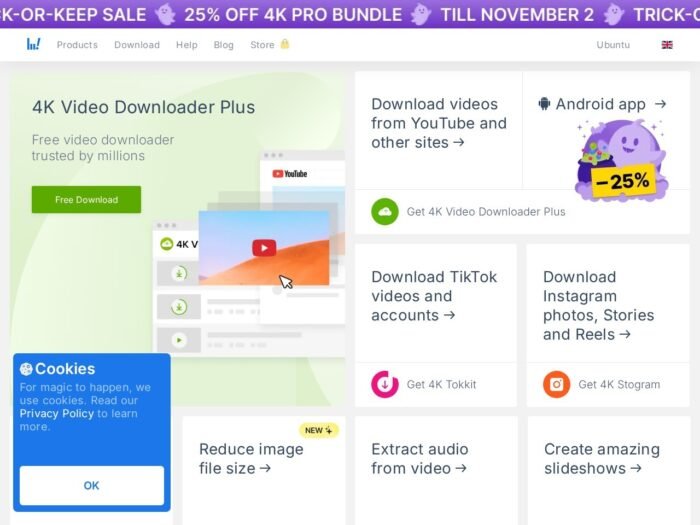
Download 4K Video Downloader Plus for Windows
Official download from 4kdownload.com.
Paste a link, save a file. Paid tiers lift the daily cap and extras. You do not need a crack.
Download 4K Video Downloader Plus 26.3.2 for Windows
Windows 10/11 64-bit (Plus current line targets recent Windows) · 26.3.2.0392 · Free cap · Lite / Personal / Pro paid
Official downloads: 4kdownload.com/downloads.
Home: 4kdownload.com.
Do not run 4K_Video_Downloader_Plus_Full_Crack.exe. That is not Open Media.
Work PCs: Pro / business terms on their store. One key, limited PCs.
Install Plus 26.3 · Need classic 4.33? · Already licensed?
If you searched for “4K Downloader Plus full,” “26.3 portable crack,” or “unlimited”
In other words, there is no extra unlocked setup.
- First, download 26.3.2 from 4kdownload.com.
- Next, install or use their portable ZIP.
- Then, sign in / enter the key from your 4K Download order.
- Finally, stay inside the free daily cap if you did not pay.
A “26.3 pre-activated” folder plus a patch is stolen licensing. Grey-market keys are often recycled seats.
Copyright: downloading a film, course, or someone else’s channel without permission is still infringement. This article will not walk through playlist ripping.
Your download should start on 4kdownload.com
For example, if the EXE is 12 MB named Youtube_Downloader_Pro_2026 from a portal, leave.
What to do next
- Open 4K downloads.
- Next, choose the Windows 64-bit installer (~207 MB) or portable (~229 MB). The 0.8 MB file is an online stub.
- Then, install it.
- Finally, open Plus. Use it only on URLs you are allowed to save.
Typical folder: C:\Program Files\4KDownload\4K Video Downloader+ (name can vary).
Windows 10 holdouts: vendor still hosts classic 4K Video Downloader 4.33.5. Confirm on their table before you assume Plus 26.x runs.
Sister apps on the same page (YouTube to MP3, Tokkit, Image Compressor) are different installers.
Windows may warn you. Check the publisher.
- First, confirm the publisher reads Open Media / 4K Download.
- Next, SmartScreen can appear on a new 200 MB setup. Use More info only if the signature matches.
- However, do not turn off Defender to “unlock 8K.”
- Finally, get the portable ZIP from their site only.
Pick the right Windows file
| Product | What you get | Who it is for |
|---|---|---|
| Plus 26.3.2 installer | Current app | This page |
| Plus portable | Official USB build | No install |
| Classic 4.33.5 | Older branch | Older Windows |
| 4K YouTube to MP3 | Audio-focused sister | Other download |
| yt-dlp | Different project | Not this EXE |
Not this download
- For example, “Free YouTube downloader 2026” bundles.
- Similarly, IDM labelled 4K.
- Also, an Android APK on this Windows page.
4K Video Downloader trial and licence
Free Starter: daily / playlist caps (vendor changes these). Paid: Lite (year), Personal / Pro (they sell lifetime-style keys with a PC limit). Cancel a Lite sub in the 4K Download account.
For example, a $5 “Plus lifetime 2026” key from a forum is not Open Media.
Will 4K Video Downloader run on this PC?
Plus current line: 64-bit Windows 10/11 (they dropped Win 7/8). Classic 4.33.x if the new build refuses Win 10. Internet required. AI extras want a modern CPU/GPU. ~200 MB for the full installer.
| Plus 26.3 | Classic 4.33 | |
|---|---|---|
| OS | Win10/11 64-bit | Older fallback |
| Disk | ~200 MB + downloads | Smaller |
| Network | Required | Required |
Already installed? In-app / site update to 26.3.2. You do not download a second “Plus full.”
Install 4K Video Downloader and first launch
First run
- First, open 4K Video Downloader Plus.
- Next, activate if you paid.
- Then, read the site’s licence and the host site’s terms before you paste anything.
- Finally, if you only needed an offline copy of your upload, that is the legitimate job.
Uninstall: Settings → Apps.
If it did not work
- Specifically, a daily cap means you’re on Starter.
- Similarly, Win 7 is unsupported on Plus.
- Finally, if you see 25 MB 4K_Unlocked — leave.
Why people still install the official app
- For example, a signed installer vs random “YouTube MP4” sites.
- In addition, 26.3.2 was still updated August 2026.
- Also, a portable from the same vendor.
However, it will not make copyrighted streams legal to keep.
Questions before you trust the installer
Is this the official file?
Specifically, yes if it came from 4kdownload.com and the publisher is Open Media.
Is Plus free?
In short, capped Starter. Paid for more.
Plus vs classic?
Specifically, Plus is the current 26.x line. 4.33.5 is the old product they still host.
Safe?
Official 4K Download installer. However, forum “Plus 2026 full” files are the risk.
After you have the file
Install 26.3.2 from 4kdownload.com. Pay them if you need the cap lifted. Do not use it to steal other people’s catalogues.
Downloads: 4kdownload.com/downloads/34
Publisher: Open Media / 4K Download. 4K Video Downloader is their mark. Report a page that wrapped this installer in a crack.